Resource
GCP
Spanner DeFi connector and InferenceThis solution connects to a decentralized exchange https://mango.markets over Solana Blockchain and streams real-time information on Solana perpetual futures into Google Spanner. Training and inference are included
1
Copied!
Spanner DeFi connector and Timeseries GPU train/inference example
This solution connects to a decentralized exchange https://mango.markets over Solana Blockchain and streams real-time information on Solana perpetual futures into Google Spanner. We use the data to train the model in Vertex AI notebook using Nvidia CUDA 11 capable graphic card to predict the price-delta of the asset with variable time horizon.
Google cloud platform real-time training/inference architecture
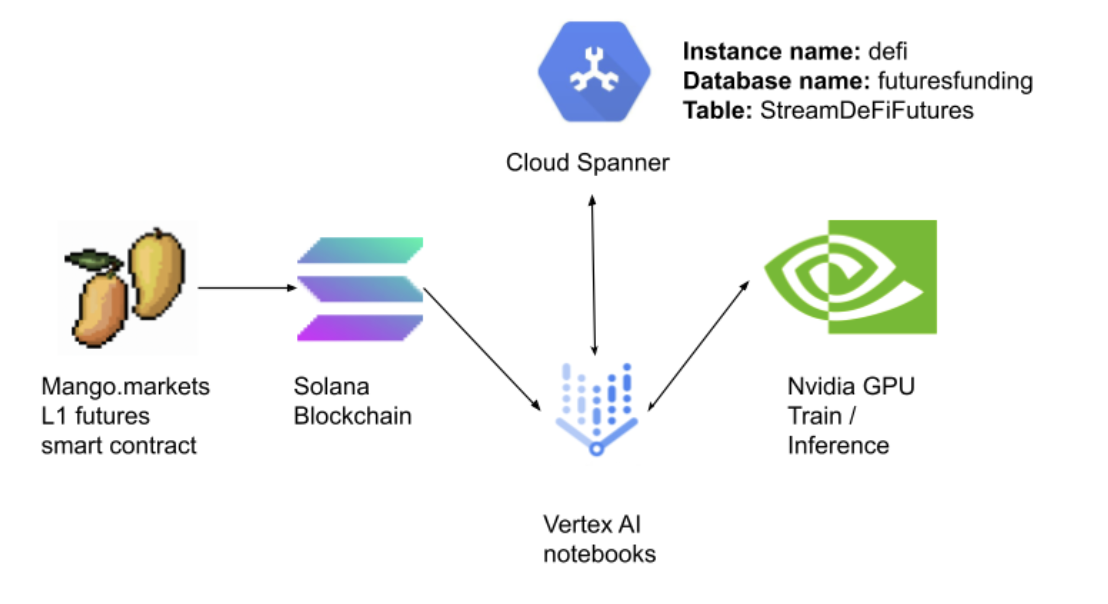
- Create Cloud Spanner instance called 'DeFi'. Open the Cloud shell or use the UI
gcloud spanner instances create defi --config=regional-us-central1 \
    --description="Defi Futures stream" --nodes=1
- You could be prompted to enable Spanner APIs, this might take a minute.
- Create a new Vertex AI notebook with CUDA 11 GPU and Python 3+ support [Optional] (code will work without GPU as well)
- Go to https://console.cloud.google.com/vertex-ai/workbench
- Click to enable notebooks API if you have not done so
- Click on new notebook -> Python 3 (CUDA Toolkit 11.0) -> With 1 NVIDIA Tesla T4 [optional]
- Chose the region and check the "Install NVIDIA GPU Driver automatically for me"
- After the notebook has been created, click on 'Open Jupyterlab'
- Open a shell inside the notebook and clone the project -> navigate inside of the cloned project
git clone https://github.com/galic1987/spanner-nvidia-vertex-inference-demo
cd spanner-nvidia-vertex-inference-demo
- Install the dependencies with pip from requriements.txt Write the following line in notebook cell
!pip install -r requirements.txt
- Create a role and access key for spanner -> save it in the project and name it key.json
- Go to https://console.cloud.google.com/iam-admin/serviceaccounts
- Click on create service account
- Give it an arbitrary name
- Give it Cloud Spanner Admin Role
- Click Done
- Click on the new service account three dots and click 'Manage Keys'
- Click on add key -> Create new key -> JSON
- Create a new file key.json inside the Vertex notebook cloned project folder /spanner-nvidia-vertex-inference-demo and paste the contents of downloaded key inside key.json
- Create a table 'StreamDeFiFutures'
Run 1_create_database_and_table.ipynb notebook.
- If everything is ok the output should be
Waiting for operation to complete...
Created database futuresfunding on instance defi
- Run the data stream ingestion job
Open shell
conda create -n python39 python=3.9.2
conda activate python39
cd spanner-nvidia-vertex-inference-demo
pip install -r requirements-connector.txt
python 2_connector_stream.py
- If everything is ok the output should be
Inserted instance data.{'DATA_KEY': '83bfca51-7f81-43e1-9240-dad2df820d47', 'FUNDING': Decimal('-0.000017749'), 'OPEN_INTEREST': Decimal('370173.500000000'), 'ORACLE_PRICE': Decimal('40.735000000'), 'MID_PRICE': Decimal('40.735000000'), 'LONG_FUNDING': Decimal('148554.672244567'), 'SHORT_FUNDING': Decimal('148554.672244567'), 'APR': Decimal('-0.155484342'), 'APY': Decimal('-0.144000701'), 'SPREAD': Decimal('0.010000000'), 'SYMBOL': 'SOL-PERP', 'OBSERVATION_TIME': 'spanner.commit_timestamp()'}
- Wait until you see some data -> run the GPU traning / inference code
Run 3_spanner_gpu_train_inference.ipynb notebook.
- ML code is broken into following sections:
- Spanner query data retrieval
- Data preprocessing
- Time-series feature engineering
- Target shift for variable time horizon
- GPU Training and hyperparameter tuning
- GPU Inference and visualization
- Feature importance
- Model visualization
Publisher
GCP
Latest Version1
UpdatedApril 4, 2023 UTC
Compressed Size2.39 MB