
End to End sample workflow for N Gram language model starting with training in TAO Toolkit and deployment using Riva.
N-gram Language Modelling using Transfer Learning Toolkit
Transfer learning is the process of transferring learned features from one application to another. It is a commonly used training technique where you use a model trained on one task and re-train to use it on a different task.
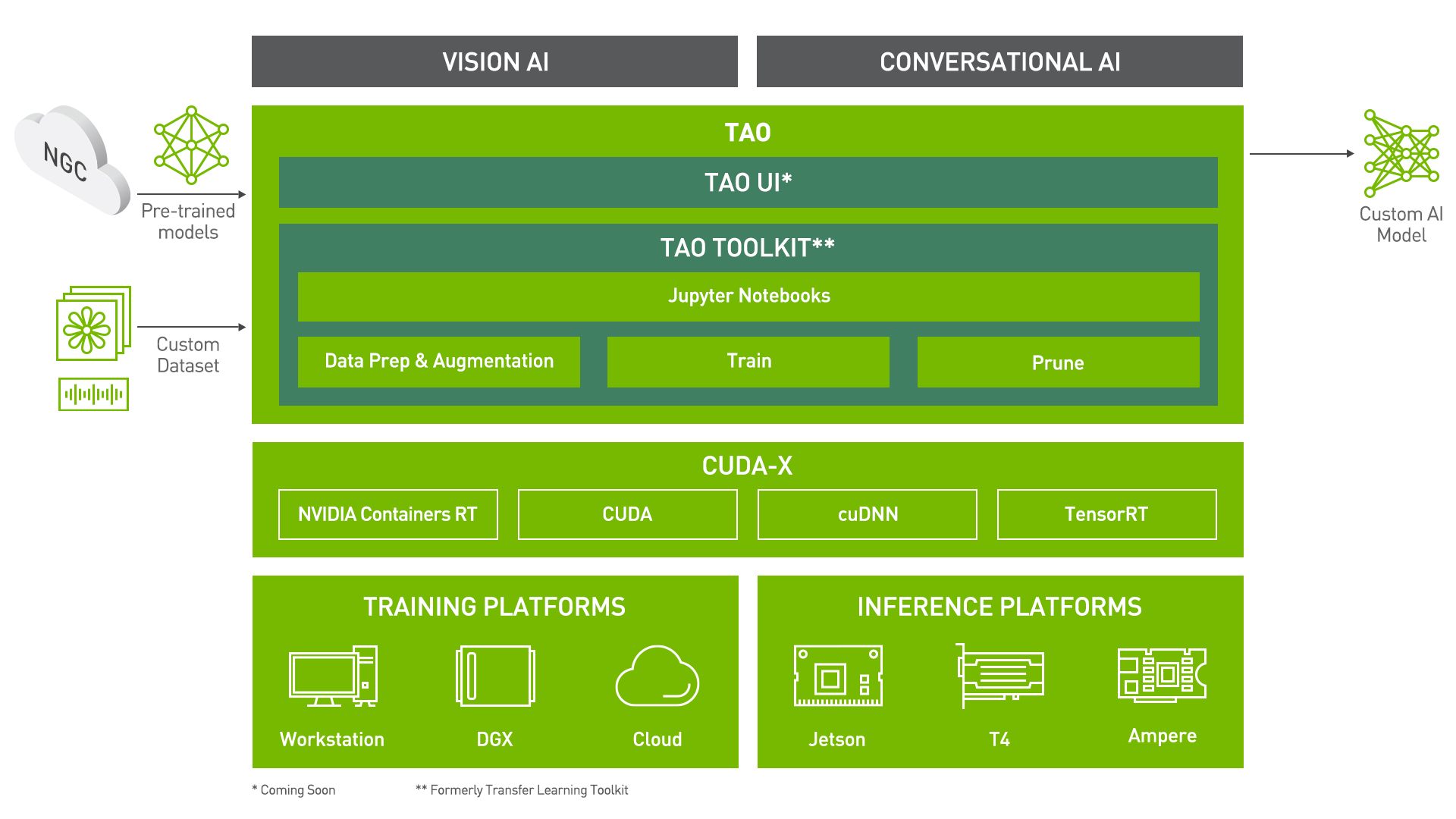
Train Adapt Optimize (TAO) Toolkit is a simple and easy-to-use Python based AI toolkit for taking purpose-built AI models and customizing them with users' own data. Developers, researchers and software partners building Conversational AI and Vision AI can leverage TAO Toolkit to avoid the hassle of training from scratch, and significantly accelerate their workflow.
 <\center>
Learning Objectives
In this notebook, you will learn how to leverage the simplicity and convenience of TAO Toolkit to:
- Pre-process/convert a dataset for the Language Modelling task.
- Train/Finetune a N-gram language model on the Librispeech LM Normalized dataset
- Run Inference and Evaluate our trained model on the Librispeech dev-clean dataset
- Export in a format suitable for deployment in Riva.
The earlier sections in the notebook give a brief introduction to the N-gram Language Modelling task, the datasets used for training and evaluating our N-gram language model. If you are already familiar with these, and want to jump right in, you can start at section on Data Preparation.
Pre-requisites
For ease of use, please install TAO Toolkit inside a python virtual environment. We recommend performing this step first and then launching the notebook from the virtual environment.
Let's install TAO Toolkit. It is a simple pip install!
To see the docker image versions and the tasks that tao can perform, use the tao info command.
In addition to installing TAO Toolkit package, please make sure of the following software requirements:
- python 3.6.9
- docker-ce > 19.03.5
- docker-API 1.40
- nvidia-container-toolkit > 1.3.0-1
- nvidia-container-runtime > 3.4.0-1
- nvidia-docker2 > 2.5.0-1
- nvidia-driver >= 455.23
Check if the GPU device(s) is visible
Language Modelling
Task Description
Language modelling returns a probability distribution over a sequence of words. Besides assigning a probability to a sequence of words, the language models also assign a probability for the likelihood of a given word (or a sequence of words) that follows a sequence of words.
The sentence: all of a sudden I notice three guys standing on the sidewalk would be scored higher than the sentence: on guys all I of notice sidewalk three a sudden standing the by the language model.
A language model trained on large corpus can significantly improve the accuracy of an Automatic Speech Recognition system as suggested in many recent research.
N-gram Language Model
There are primarily two types of Language Models
- N-gram Language Models: These models use frequency of n-grams to learn the probability distribution over words. Two benefits of N-gram Language Model are simplicity and scalability – with larger n, a model can store more context with a well-understood space–time tradeoff, enabling small experiments to scale up efficiently.
- Neural Language Models: They use different kinds of Neural Networks to model the probability distribution over words, and have surpassed the N-gram language models in the ability to model language, but are generally slower to evaluate.
In this notebook, we will show how to train, evaluate and optionally finetune a N-gram language model leveraging TAO Toolkit.
Preparing the dataset
Librispeech LM Normalized dataset
For this tutorial, we use the normalized version of Librispeech LM dataset to train our N-gram language model. The normalized version of Librispeech LM dataset is available here.
Librispeech dev-clean dataset
For this tutorial, we also use the clean version of Librispeech development set to evaluate our N-gram language model. The clean version of Librispeech development set is available here.
Downloading the dataset
Librispeech LM Normalized dataset
The training data is publicly available here and can be downloaded directly.
Librispeech dev-clean dataset
The evaluation data is publicly available here and can be downloaded directly. We provided a Python script to download and preprocess the dataset for users
For the sake of reducing the time this demo takes, we reduce the number of lines of the training dataset. Feel free to modify the number of used lines.
TAO Toolkit workflow
The rest of the notebook shows what a sample TAO Toolkit workflow looks like.
Setting TAO Toolkit Mounts
Now that our dataset has been downloaded, an important step in using TAO Toolkit is to set up the directory mounts. The TAO Toolkit launcher uses docker containers under the hood, and for our data and results directory to be visible to the docker, they need to be mapped. The launcher can be configured using the config file ~/.tao_mounts.json. Apart from the mounts, you can also configure additional options like the Environment Variables and amount of Shared Memory available to the TAO Toolkit launcher.
IMPORTANT NOTE: The code below creates a sample ~/.tao_mounts.json file. Here, we can map directories in which we save the data, specs, results and cache. You should configure it for your specific case such your these directories are correctly visible to the docker container. Please also ensure that the source directories exist on your machine!
The rest of the notebook exemplifies the simplicity of the TAO Toolkit workflow. Users with basic knowledge of Deep Learning can get started building their own custom models using a simple specification file. It's essentially just one command each to run data preprocessing, training, fine-tuning, evaluation, inference, and export! All configurations happen through YAML spec files
Configuration/Specification Files
The essence of all commands in TAO Toolkit lies in the YAML spec files. There are sample spec files already available for you to use directly or as reference to create your own. Through these spec files, you can tune many knobs like the model, dataset, hyperparameters etc. Each command (like train, finetune, evaluate etc.) should have a dedicated spec file with configurations pertinent to it.
Here is an example of the training spec file:
model:
  intermediate: True
  order: 2
  pruning:
    - 0
training_ds:
  is_tarred: false
  is_file: true
  data_file: ???

vocab_file: ""
encryption_key: "tlt_encode"
...
Set Relevant Paths
Please set these paths according to your environment.
Downloading Specs
We can proceed to downloading the spec files. The user may choose to modify/rewrite these specs, or even individually override them through the launcher. You can download the default spec files by using the download_specs command.
The -o argument indicating the folder where the default specification files will be downloaded, and -r that instructs the script where to save the logs. Make sure the -o points to an empty folder!
Data Convert
In preparation for training/fine-tuning, we need to preprocess the dataset. tao n_gram dataset_convert command can be used in conjunction with appropriate configuration in the spec file. Here is the sample dataset_convert.yaml spec file we use:
# Dataset. Available options: [assistant]
dataset_name: assistant

# Extension of the files containing in dataset
extension: ???

# Path to the folder containing the dataset source files.
source_data_dir: ???

# Path to the output folder.
target_data_file: ???
We encourage you to take a look at the .yaml spec files we provide!
As we show below, you can override the source_data_dir and target_data_dir options with appropriate paths.
The command preprocess training and evaluation dataset using basic text preprocessings include convert lowercase, normalization, remove punctuation, ... and write the results into files named preprocessed.txt and preprocessed_dev_clean.txt for training and evaluation correspondingly. In both preprocessed.txt and preprocessed_dev_clean.txt, each preprocessed sentence corresponds to a new line.
Training a model using TAO Toolkit is as simple as configuring your spec file and running the train command. The code cell below uses the train.yaml spec file available for users as reference. The spec file configurations can easily be overridden using the tao-launcher CLI as shown below. For instance, below we override model.order, model.pruning and training_ds.data_file configurations to suit our needs.
For training a N-gram language model in TAO Toolkit, we use the tao n_gram train command with the following args:
-e: Path to the spec file-k: User specified encryption key to use while saving/loading the model-r: Path to a folder where the outputs should be written. Make sure this is mapped in tlt_mounts.json- Any overrides to the spec file eg.
model.order
More details about these arguments are present in the TAO Toolkit Getting Started Guide
Note: All file paths correspond to the destination mounted directory that is visible in the TAO Toolkit docker container used in backend.
The train command produces 3 files called train_n_gram.arpa, train_n_gram.vocab and train_n_gram.kenlm_intermediate saved at $RESULTS_DIR/train/checkpoints.
The output of Evaluation give us the perplexity of the N-gram language model on the evaluation (Librispeech dev-clean) dataset!
Inference
Inference using a trained .arpa or .binary model uses the tao n_gram infer command.
The infer.yaml is also very simple, and we can directly give inputs for the model to run inference.
# "Simulate" user input:
input_batch:
  - 'set alarm for seven thirty am'
  - 'lower volume by fifty percent'
  - 'what is my schedule for tomorrow'

restore_from: ???
We encourage you to try out your own inputs as an exercise!
This command returns the log likelihood, perplexity and all n-grams for each of the input sequences that users provided.
With TAO Toolkit, you can also export your model in a format that can deployed using Nvidia Riva, a highly performant application framework for multi-modal conversational AI services using GPUs! The export command will convert the trained language model from .arpa to .binary with the option of quantizing the model binary. We will set export_format in the spec file to RIVA to create a .riva file contains the language model binary and its corresponding vocabulary.
The model is exported as exported-model.riva which is in a format suited for deployment in Riva.
What's Next?
You could use TAO Toolkit to build custom models for your own applications, or you could deploy the custom model to Nvidia Riva!