
The FastPitch model generates mel-spectrograms from raw input text and allows to exert additional control over the synthesized utterances.
The following sections provide greater details of the dataset, running training and inference, and the training results.
Scripts and sample code
The repository holds code for FastPitch (training and inference) and WaveGlow (inference only).
The code specific to a particular model is located in that model's directory - ./fastpitch and ./waveglow - and common functions live in the ./common directory. The model-specific scripts are as follows:
<model_name>/model.py- the model architecture, definition of forward and inference functions<model_name>/arg_parser.py- argument parser for parameters specific to a given model<model_name>/data_function.py- data loading functions<model_name>/loss_function.py- loss function for the model
In the root directory ./ of this repository, the ./train.py script is used for
training, while inference can be executed with the ./inference.py script. The
script ./models.py is used to construct a model of the requested type and properties.
The repository is structured similarly to the NVIDIA Tacotron2 Deep Learning example so that they could be combined in more advanced use cases.
Parameters
In this section, we list the most important hyperparameters and command-line arguments, together with their default values that are used to train FastPitch.
--epochs- number of epochs (default: 1000)--learning-rate- learning rate (default: 0.1)--batch-size- batch size for a single forward-backward step (default: 16)--grad-accumulation- number of steps over which gradients are accumulated (default: 2)--amp- use mixed precision training (default: disabled)--load-pitch-from-disk- pre-calculated fundamental frequency values, estimated before training, are loaded from the disk during training (default: enabled)--energy-conditioning- enables additional conditioning on energy (default: enabled)--p-arpabet- probability of choosing phonemic over graphemic representation for every word, if available (default: 1.0)
Command-line options
To review the full list of available options and their descriptions, use the -h
or --help command-line option, for example:
python train.py --help
The following example output is printed when running the model:
DLL 2021-06-14 23:08:53.659718 - epoch    1 | iter   1/48 | loss 40.97 | mel loss 35.04 | kl loss 0.02240 | kl weight 0.01000 |    5730.98 frames/s | took 24.54 s | lrate 3.16e-06
DLL 2021-06-14 23:09:28.449961 - epoch    1 | iter   2/48 | loss 41.07 | mel loss 35.12 | kl loss 0.02258 | kl weight 0.01000 |    4154.18 frames/s | took 34.79 s | lrate 6.32e-06
DLL 2021-06-14 23:09:59.365398 - epoch    1 | iter   3/48 | loss 40.86 | mel loss 34.93 | kl loss 0.02252 | kl weight 0.01000 |    4589.15 frames/s | took 30.91 s | lrate 9.49e-06
Getting the data
The FastPitch and WaveGlow models were trained on the LJSpeech-1.1 dataset.
The ./scripts/download_dataset.sh script will automatically download and extract the dataset to the ./LJSpeech-1.1 directory.
Dataset guidelines
The LJSpeech dataset has 13,100 clips that amount to about 24 hours of speech of a single female speaker. Since the original dataset does not define a train/dev/test split of the data, we provide a split in the form of three file lists:
./filelists
|-- ljs_audio_pitch_text_train_v3.txt
|-- ljs_audio_pitch_text_test.txt
|-- ljs_audio_pitch_text_val.txt
FastPitch predicts character durations just as FastSpeech does. FastPitch 1.1 aligns input symbols to output mel-spectrogram frames automatically and does not rely on any external aligning model. FastPitch training can now be started on raw waveforms without any pre-processing: pitch values and mel-spectrograms will be calculated online.
For every mel-spectrogram frame, its fundamental frequency in Hz is estimated with the Probabilistic YIN algorithm.
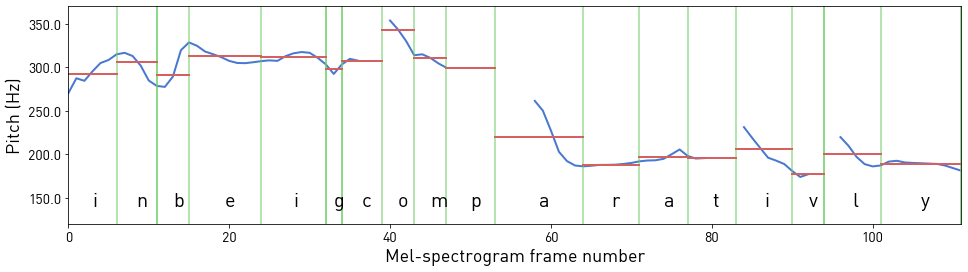
Figure 2. Pitch estimates for mel-spectrogram frames of the phrase "in being comparatively" (in blue) averaged over characters (in red). Silent letters have a duration of 0 and are omitted.
Multi-dataset
Follow these steps to use datasets different from the default LJSpeech dataset.
-
Prepare a directory with .wav files.
./my_dataset |-- wavs -
Prepare filelists with transcripts and paths to .wav files. They define the training/validation split of the data (the test is currently unused):
./filelists
|-- my-dataset_audio_text_train.txt
|-- my-dataset_audio_text_val.txt
Those filelists should list a single utterance per line as:
`<audio file path>|<transcript>`The
<audio file path>is the relative path to the path provided by the--dataset-pathoption oftrain.py. -
Run the pre-processing script to calculate pitch:
python prepare_dataset.py \ --wav-text-filelists filelists/my-dataset_audio_text_train.txt \ filelists/my-dataset_audio_text_val.txt \ --n-workers 16 \ --batch-size 1 \ --dataset-path $DATA_DIR \ --extract-pitch \ --f0-method pyin -
Prepare file lists with paths to pre-calculated pitch:
./filelists
|-- my-dataset_audio_pitch_text_train.txt
|-- my-dataset_audio_pitch_text_val.txt
In order to use the prepared dataset, pass the following to the train.py script:
--dataset-path ./my_dataset` \
--training-files ./filelists/my-dataset_audio_pitch_text_train.txt \
--validation files ./filelists/my-dataset_audio_pitch_text_val.txt
Training process
FastPitch is trained to generate mel-spectrograms from raw text input. It uses short-time Fourier transform (STFT) to generate target mel-spectrograms from audio waveforms to be the training targets.
The training loss is averaged over an entire training epoch, whereas the
validation loss is averaged over the validation dataset. Performance is
reported in total output mel-spectrogram frames per second and recorded as train_frames/s (after each iteration) and avg_train_frames/s (averaged over epoch) in the output log file ./output/nvlog.json.
The result is averaged over an entire training epoch and summed over all GPUs that were
included in the training.
The scripts/train.sh script is configured for 8x GPU with at least 16GB of memory:
--batch-size 16
--grad-accumulation 2
In a single accumulated step, there are batch_size x grad_accumulation x GPUs = 256 examples being processed in parallel. With a smaller number of GPUs, increase --grad_accumulation to keep this relation satisfied, e.g., through env variables
NUM_GPUS=1 GRAD_ACCUMULATION=16 bash scripts/train.sh
Inference process
You can run inference using the ./inference.py script. This script takes
text as input and runs FastPitch and then WaveGlow inference to produce an
audio file. It requires pre-trained checkpoints of both models
and input text as a text file, with one phrase per line.
Pre-trained FastPitch models are available for download on NGC.
Having pre-trained models in place, run the sample inference on LJSpeech-1.1 test-set with:
bash scripts/inference_example.sh
Examine the inference_example.sh script to adjust paths to pre-trained models,
and call python inference.py --help to learn all available options.
By default, synthesized audio samples are saved in ./output/audio_* folders.
FastPitch allows us to linearly adjust the rate of synthesized speech like FastSpeech.
For instance, pass --pace 0.5 for a twofold decrease in speed.
For every input character, the model predicts a pitch cue - an average pitch over a character in Hz. Pitch can be adjusted by transforming those pitch cues. A few simple examples are provided below.
| Transformation | Flag | Samples |
|---|---|---|
| - | - | link |
| Amplify pitch wrt. to the mean pitch | --pitch-transform-amplify | link |
| Invert pitch wrt. to the mean pitch | --pitch-transform-invert | link |
| Raise/lower pitch by | --pitch-transform-shift <hz> | link |
| Flatten the pitch to a constant value | --pitch-transform-flatten | link |
| Change the rate of speech (1.0 = unchanged) | --pace <value> | link |
The flags can be combined. Modify these functions directly in the inference.py script to gain more control over the final result.
You can find all the available options by callng python inference.py --help.
More examples are presented on the website with samples.
Example: Training a model on Mandarin Chinese
FastPitch can easily be trained or fine-tuned on datasets in various languages. We present an example of training on the Mandarin Chinese dataset capable of pronouncing phrases in English (for example, brand names). For an overview of the deployment of this model in Chunghwa Telecom, refer to the blogpost (in Chinese).
-
Set up the repository and run a Docker container
Follow stetps 1. and 2. of the Quick Start Guide.
-
Download the data
The dataset for this section has been provided by Chunghwa Telecom Laboratories and is available for download on NGC under the CC BY-NC 4.0 license.
The dataset can be downloaded manually after signing in to NGC as
files.ziporSF_bilingual.zip, depending on the method (manual or via command line). Afterward, it has to be pre-processed to extract pitch for training and prepare train/dev/test filelists:pip install -r scripts/mandarin_chinese/requirements.txt bash scripts/mandarin_chinese/prepare_dataset.sh path/to/files.zipThe procedure should take about half an hour. If it completes successfully,
./data/SF_bilingual prepared successfully.will be written to the standard output.After pre-processing, the dataset will be located at
./data/SF_bilingual, and training/inference filelists at./filelists/sf_*. -
Add support for textual inputs in the target language.
The model is trained end-to-end, and supporting a new language requires to specify the input
symbol set,text normalizationroutines, and (optionally) grapheme-to-phoneme (G2P) conversion for phoneme-based synthesis. Our main modifications touch the following files:./common/text |-- symbols.py |-- text_processing.py |-- zh |-- chinese.py |-- mandarin_text_processing.py |-- pinyin_dict.txtWe make small changes to
symbols.pyandtext_processing.pyand keep the crucial code in thezhdirectory.We design our Mandarin Chinese symbol set as an extension of the English symbol set, appending to
symbolslists of_mandarin_phonemesand_chinese_punctuation:# common/text/symbols.py def get_symbols(symbol_set='english_basic'): # ... elif symbol_set == 'english_mandarin_basic': from .zh.chinese import chinese_punctuations, valid_symbols as mandarin_valid_symbols # Prepend "#" to mandarin phonemes to ensure uniqueness (some are the same as uppercase letters): _mandarin_phonemes = ['#' + s for s in mandarin_valid_symbols] _pad = '_' _punctuation = '!\'(),.:;? ' _chinese_punctuation = ["#" + p for p in chinese_punctuations] _special = '-' _letters = 'ABCDEFGHIJKLMNOPQRSTUVWXYZabcdefghijklmnopqrstuvwxyz' symbols = list(_pad + _special + _punctuation + _letters) + _arpabet + _mandarin_phonemes + _chinese_punctuationText normalization and G2P are performed by a
TextProcessinginstance. We implement Mandarin text processing inside aMandarinTextProcessingclass. For G2P, an off-shelf pypinyin phonemizer and the CMU Dictionary are used.MandarinTextProcessingis applied to the data only ifenglish_mandarin_basicsymbol set is in use:# common/text/text_processing.py def get_text_processing(symbol_set, text_cleaners, p_arpabet): if symbol_set in ['englh_basic', 'english_basic_lowercase', 'english_expanded']: return TextProcessing(symbol_set, text_cleaners, p_arpabet=p_arpabet) elif symbol_set == 'english_mandarin_basic': from common.text.zh.mandarin_text_processing import MandarinTextProcessing return MandarinTextProcessing(symbol_set, text_cleaners, p_arpabet=p_arpabet)Note that text normalization is dependent on the target language, domain, and assumptions on how normalized the input already is.
-
Train the model
The
SF datasetis rather small (4.5 h compared to 24 h inLJSpeech-1.1). There are numerous English phrases in the transcriptions, such as technical terms and proper nouns. Thus, it is beneficial to initialize model weights with a pre-trained English model from NGC, using the flag--init-from-checkpoint.Note that by initializing with another model, possibly trained on a different symbol set, we also initialize grapheme/phoneme embedding tables. For this reason, we design the
english_mandarin_basicsymbol set as an extension ofenglish_basic, so that the same English phonemes would retain their embeddings.In order to train, issue
NUM_GPUS=<available_gpus> GRAD_ACCUMULATION=<number> bash scripts/mandarin_chinese/train.shAdjust the variables to satisfy
$NUM_GPUS x $GRAD_ACCUMULATION = 256.The model will be trained for 1000 epochs. Note that we have disabled mixed-precision training, as we found it unstable at times on this dataset.
-
Synthesize
After training, samples can be synthesized (audio sample):
bash scripts/mandarin_chinese/inference.shPaths to specific checkpoints can be supplied as env variables or changed directly in the
.shfiles.