
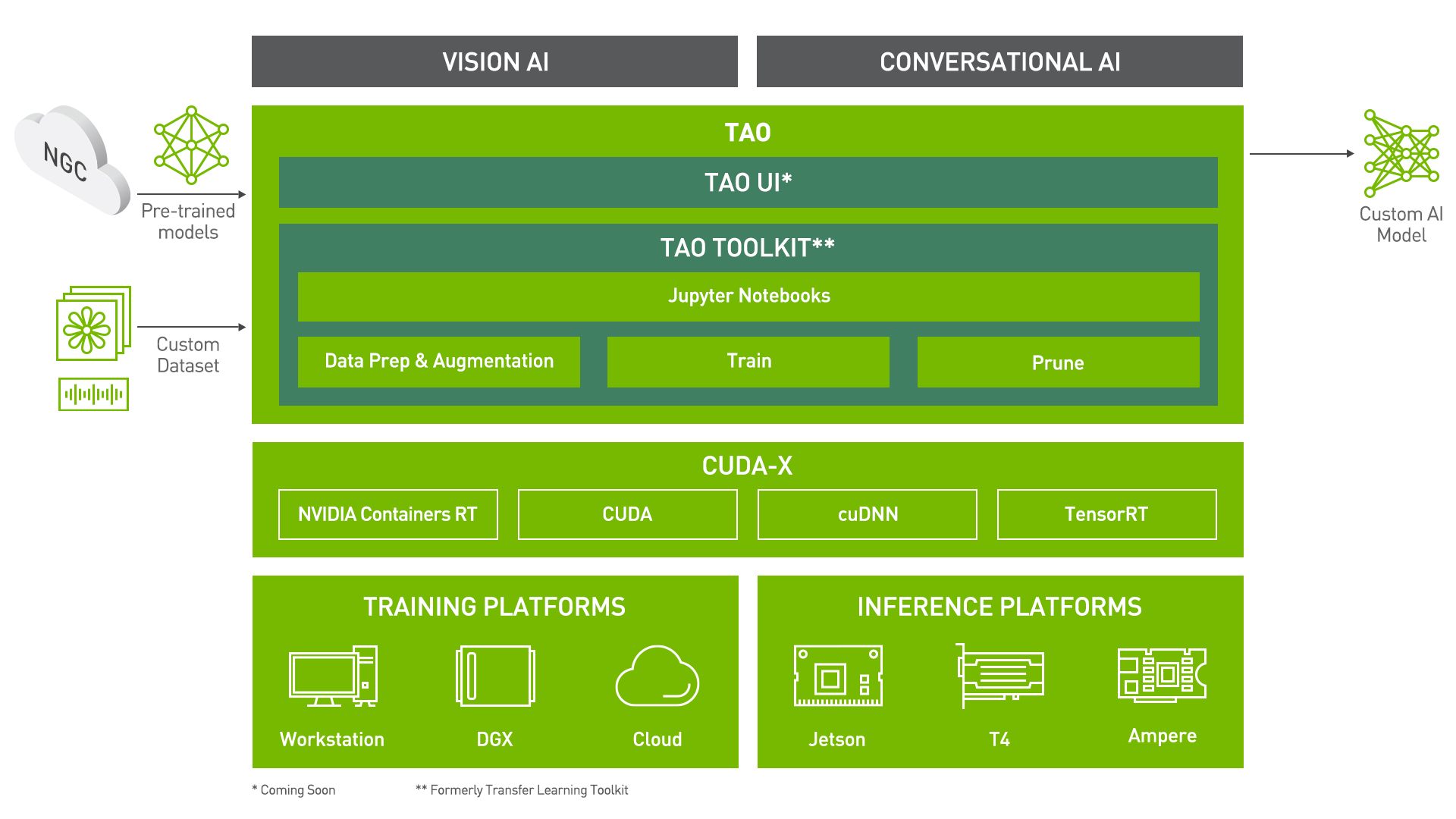
End to End workflow for punctuation and capitalization starting with training in TAO Toolkit and deployment using Riva.
Punctuation And Capitalization using Train Adapt Optimize (TAO) Toolkit
Train Adapt Optimize (TAO) Toolkit is a python based AI toolkit for taking purpose-built pre-trained AI models and customizing them with your own data.
Transfer learning extracts learned features from an existing neural network to a new one. Transfer learning is often used when creating a large training dataset is not feasible.
Developers, researchers and software partners building intelligent vision AI apps and services, can bring their own data to fine-tune pre-trained models instead of going through the hassle of training from scratch.
The goal of this toolkit is to reduce that 80 hour workload to an 8 hour workload, which can enable data scientist to have considerably more train-test iterations in the same time frame.
In this notebook, you will learn how to leverage the simplicity and convenience of TAO to:
- Take a BERT model and Train/Finetune it on a dataset for Punctuation and Capitalization task
- Run Inference
- Export the model to the ONNX format, or export in the format that is suitable for deployment in Riva
The earlier section in this notebook gives a brief introduction to the Punctuation and Capitalization task and the dataset being used.
Prerequisites
For ease of use, please install TAO inside a python virtual environment. Steps to install the virtual environment are mentioned here. We recommend performing this step first and then launching the notebook from the virtual environment.
In addition to installing TAO package, please make sure of the following software requirements:
- python 3.6.9
- docker-ce > 19.03.5
- docker-API 1.40
- nvidia-container-toolkit > 1.3.0-1
- nvidia-container-runtime > 3.4.0-1
- nvidia-docker2 > 2.5.0-1
- nvidia-driver >= 455.23
Let's install TAO. It is a simple pip install!
Check if the GPU device(s) are available.
Punctuation And Capitalization using TAO
Task Description
Automatic Speech Recognition (ASR) systems typically generate text with no punctuation and capitalization of the words. This tutorial explains how to implement a model that will predict punctuation and capitalization for each word in a sentence to make ASR output more readable and to boost performance of the named entity recognition, machine translation or text-to-speech models. We'll show how to train a model for this task using a pre-trained BERT model. For every word in our training dataset we’re going to predict:
- punctuation mark that should follow the word
- whether the word should be capitalized
TAO Workflow
Setting TAO Mounts
Once the TAO gets installed, the next step is to set up the directory mounts that is the source and destination. The source_mount will store all the data, pre-trained models and scripts pertaining to Punctuation and Capitalization task. Please select an empty directory for source_mount.
The destination_mount is the directory to which source_mount will be mapped to, inside the container.
The TAO launcher uses docker container under the hood, and for our data and results directory to be visible to the docker, they must be mapped.
The launcher can be configured using the config file .tlt_mounts.json. Apart from the mounts you can also configure additional options like the Environmental Variables and amount of Shared Memory available to the TAO launcher.
Important Note: The code below creates a sample .tlt_mounts.json file. Here, we can map directories in which we save the data, specs, results and cache. You must configure it for your specific case to make sure both your data and results are correctly mapped to the docker. Please also ensure that the source directories exist on your machine!
The rest of the notebook exemplifies the simplicity of the TAO workflow. Users with any level of Deep Learning knowledge can get started building their own custom models using a simple specification file. It's essentially just one command each to run data download and preprocessing, training, fine-tuning, evaluation, inference, and export. All configurations happen through YAML specification files
Configuration/Specification Files
All commands in TAO lies in the YAML specification files. There are sample specification files already available for you to use directly or as reference to create your own YAML specification files.
Through these specification files, you can tune many a lot of things like the model, dataset, hyperparameters, optimizer etc.
Each command (like download_and_convert, train, finetune, evaluate etc.) should have a dedicated specification file with configurations pertinent to it.
Here is an example of the training spec file:
save_to: trained-model.tlt

trainer:
  max_epochs: 5

model:
  punct_label_ids:
    O: 0
    ',': 1
    '.': 2
    '?': 3

  capit_label_ids:
    O: 0
    U: 1

  tokenizer:
      tokenizer_name: ${model.language_model.pretrained_model_name} # or sentencepiece =
      vocab_file: null # path to vocab file
      tokenizer_model: null # only used if tokenizer is sentencepiece
      special_tokens: null

  language_model:
    pretrained_model_name: bert-base-uncased
    lm_checkpoint: null
    config_file: null # json file, precedence over config
    config: null

  punct_head:
    punct_num_fc_layers: 1
    fc_dropout: 0.1
    activation: 'relu'
    use_transformer_init: true

  capit_head:
    capit_num_fc_layers: 1
    fc_dropout: 0.1
    activation: 'relu'
    use_transformer_init: true

# Data dir containing dataset.
data_dir: ???

training_ds:
  text_file: text_train.txt
  labels_file: labels_train.txt
  shuffle: true
  num_samples: -1 # number of samples to be considered, -1 means the whole the dataset
  batch_size: 64

validation_ds:
  text_file: text_dev.txt
  labels_file: labels_dev.txt
  shuffle: false
  num_samples: -1 # number of samples to be considered, -1 means the whole the dataset
  batch_size: 64

optim:
  name: adam
  lr: 1e-5
  weight_decay: 0.00

  sched:
    name: WarmupAnnealing
    # Scheduler params
    warmup_steps: null
    warmup_ratio: 0.1
    last_epoch: -1

    # pytorch lightning args
    monitor: val_loss
    reduce_on_plateau: false
Set Relevant Paths
Please set these paths according to your environment.
Downloading Specs
We can proceed to downloading the spec files. The user may choose to modify/rewrite these specs, or even individually override them through the launcher. You can download the default spec files by using the download_specs command.
The -o argument indicating the folder where the default specification files will be downloaded, and -r that instructs the script where to save the logs. Make sure the -o points to an empty folder!
Dataset
This model can work with any dataset as long as it follows the format specified below. The training and evaluation data is divided into 2 files: text.txt and labels.txt. Each line of the text.txt file contains text sequences, where words are separated with spaces: [WORD] [SPACE] [WORD] [SPACE] [WORD], for example:
when is the next flight to new york
the next flight is ...
...
The labels.txt file contains corresponding labels for each word in text.txt, the labels are separated with spaces. Each label in labels.txt file consists of 2 symbols:
- the first symbol of the label indicates what punctuation mark should follow the word (where O means no punctuation needed);
- the second symbol determines if a word needs to be capitalized or not (where U indicates that the word should be upper cased, and O - no capitalization needed.) In this tutorial, we are considering only commas, periods, and question marks the rest punctuation marks were removed. To use more punctuation marks, update the dataset to include desired labels, no changes to the model needed.
Each line of the labels.txt should follow the format: [LABEL] [SPACE] [LABEL] [SPACE] [LABEL] (for labels.txt). For example, labels for the above text.txt file should be:
OU OO OO OO OO OO OU ?U
OU OO OO OO ...
...
The complete list of all possible labels for this task used in this tutorial is: OO, ,O, .O, ?O, OU, ,U, .U, ?U.
Download and preprocess the data
In this notebook we are going to use a subset of English examples from the Tatoeba collection of sentences.
Downloading and preprocessing the data using TAO is as simple as configuring YAML specification file and running the download_and_convert_tatoeba command. The code cell below uses the default download_and_convert_tatoeba.yaml available for the users as a reference.
The configurations in the specification file can be easily overridden using the tao-launcher CLI as shown below. For instance, we override the source_data_dir and target_data_dir configurations.
We encourage you to take a look at the YAML files we have provided.
After executing the cell below, your data folder will contain the following 4 files:
- labels_dev.txt
- labels_train.txt
- text_dev.txt
- text_train.txt
Training
In the Punctuation and Capitalization Model, we are jointly training two token-level classifiers on top of the pretrained BERT model:
- one classifier to predict punctuation and
- the other one - capitalization.
Training a model using TAO is as simple as configuring your spec file and running the train command. The code cell below uses the default train.yaml available for users as reference. It is configured by default to use the bert-base-uncased pretrained model. Additionally, these configurations could easily be overridden using the tao-launcher CLI as shown below. For instance, below we override the trainer.max_epochs, training_ds.num_samples and validation_ds.num_samples configurations to suit our needs. We encourage you to take a look at the .yaml spec files we provide!
The command for training is very similar to the of download_and_convert_tatoeba. Instead of tao punctuation_and_capitalization download_and_convert_tatoeba, we use tao punctuation_and_capitalization train instead. The tao punctuation_and_capitalization train command has the following arguments:
-e: Path to the spec file-g: Number of GPUs to use-k: User specified encryption key to use while saving/loading the model-r: Path to the folder where the outputs should be written. Make sure this is mapped in the tlt_mounts.json- Any overrides to the spec file eg. trainer.max_epochs
More details about these arguments are present in the TAO Getting Started Guide.
NOTE: All file paths corresponds to the destination mounted directory that is visible in the TAO docker container used in backend.
The train command produces a .tlt file called trained-model.tlt saved at $RESULTS_DIR/checkpoints/trained-model.tlt
Other tips and tricks:
- To accelerate the training without loss of quality, it is possible to train with these parameters:
trainer.amp_level="O1"andtrainer.precision=16for reduced precision. - The batch size
training_ds.batch_sizemay influence the validation accuracy. Larger batch sizes are faster to train with, however, you may get slightly better results with smaller batches. - You can also change the optimizer parameter
optim.nameand can see its effect on the punctuation and capitalization task by the change in accuracy. - You can specify the number of layers in the head of the model
model.punct_head.punct_num_fc_layersandmodel.capit_head.capit_num_fc_layers.
Finetuning
As stated above the command for all the tasks are very similar but have different YAML specification files that can be tweaked.
Note: If you wish to proceed with a trained dataset for better inference results, you can find a .nemo model here.
Simply re-name the .nemo file to .tlt and pass it through the finetune pipeline.
The train command produces a .tlt file called finetuned-model.tlt saved in the results directory.
Evaluation
To evaluate our TAO model we will run the command below. It is always advisable to look at the YAML file for evaluate to understand the command in a better way.
On evaluating the model you will get some results and based on that we can either retrain the model for more epochs or continue with the inference.
Inference
Inference using a TAO trained and fine-tuned model can be done by tao punctuation_and_capitalization infer command. It is again advisable to look at the infer.yaml file.
Export to ONNX
ONNX is a popular open format for machine learning models. It enables interoperability between different frameworks, making the path to production much easier.
TAO provides commands to export the .tlt model to the ONNX format in an .eonnx archive. The export_format configuration can be set to ONNX to achieve this.
The tao export command for punctuation_and_capitalization is shown in the cell below.
This command exports the model as exported-model.eonnx which is essentially an archive containing the .onnx model.
Inference using ONNX
TAO provides the capability to use the exported .eonnx model for inference. The command tao punctuation_and_capitalization infer_onnx is very similar to the inference command for .tlt models. Again, the input file used is just for demo purposes, you may choose to try out your own custom input.
Export to Riva
With TAO, you can also export your model in a format that can deployed using NVIDIA Riva, a highly performant application framework for multi-modal conversational AI services using GPUs. The same command for exporting to ONNX can be used here. The only small variation is the configuration for export_format in the spec file.
The model is exported as punct-capit-model.riva which is in a format suited for deployment in Riva.
What next?
You can use TAO to build custom models for your own NLP applications.