
End to End sample workflow for Intent Slot Classification starting with training in TAO Toolkit and deployment using Riva.
Joint Intent Detection and Slot Filling using Train Adapt Optimize (TAO) Toolkit
Transfer learning is the process of transferring learned features from one application to another. It is a commonly used training technique where you use a model trained on one task and re-train to use it on a different task.
**Train Adapt Optimize (TAO) Toolkit ** is a simple and easy-to-use Python based AI toolkit for taking purpose-built AI models and customizing them with users' own data. Developers, researchers and software partners building Conversational AI and Vision AI can leverage TAO to avoid the hassle of training from scratch, and significantly accelerate their workflow.
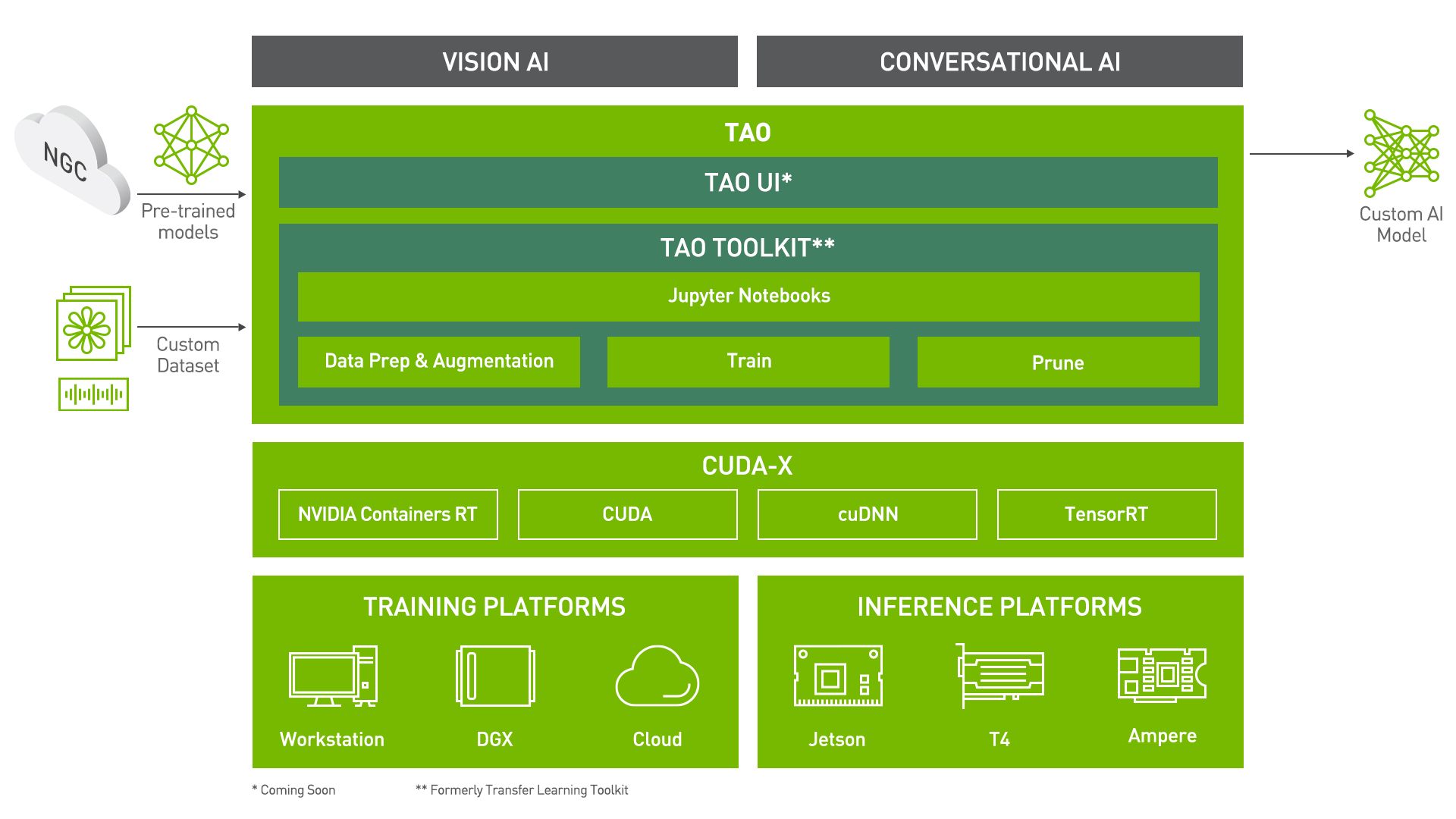 <\center>
Learning Objectives
In this notebook, you will learn how to leverage the simplicity and convenience of TAO to:
- Pre-process/convert a dataset for the Joint Intent and Slot Classification.
- Take a BERT model and Train/Finetune it on the NLU Evaluation dataset
- Run Inference
- Export the model for the ONNX format, or export in a format suitable for deployment in Riva.
The earlier sections in the notebook give a brief introduction to the Intent and Slot Classification task, the NLU Evaluation dataset and BERT. If you are already familiar with these, and want to jump right in, you can start at section on Data Preparation.
Pre-requisites
For ease of use, please install TAO inside a python virtual environment. We recommend performing this step first and then launching the notebook from the virtual environment.
Let's install TAO. It is a simple pip install!
To see the docker image versions and the tasks that tao can perform, use the tao info command.
In addition to installing TAO package, please make sure of the following software requirements:
- python 3.6.9
- docker-ce > 19.03.5
- docker-API 1.40
- nvidia-container-toolkit > 1.3.0-1
- nvidia-container-runtime > 3.4.0-1
- nvidia-docker2 > 2.5.0-1
- nvidia-driver >= 455.23
Check if the GPU device(s) is visible
Joint Intent Detection and Slot Filling
Task Description
Understanding the intent in natural language (Intent Classification) and extracting values of pertinent attributes or specific pieces of information from a sentence (Slot Filling) are two essential tasks in Natural Language Understanding (NLU). For example:
In the query: What is the weather in Santa Clara tomorrow morning? we would like to classify the query as a
weatherIntent, and detectSanta Claraas a location slot and tomorrow morning as adate_timeslot. Intents and Slots names are usually task specific and defined as labels in the training data. This is a fundamental step that is executed in any task-driven Conversational Assistant.
Recent research has shown the proficiency of BERT models in this task. TAO provides the capability to train a BERT model and perform inference for both intent detection and slot filling together.
BERT Model
In this notebook, we will show how to use a pre-trained BERT (Bidirectional Encoder Representations from Transformers) model for Joint Intent and Slot Classification leveraging TAO. The BERT model has made major breakthroughs in Natural Language Understanding in recent years. For most applications, the model is typically trained in two phases, pre-training and fine-tuning.
- The BERT core model can be pre-trained on large, generic datasets to generate dense vector representations of input sentence(s).
- It can be quickly fine-tuned to perform a wide variety of tasks such as question/answering, sentiment analysis, or named entity recognition.
The figure below shows a high-level block diagram of pre-training and fine-tuning BERT.

In alignment with the above, for pre-training we can take one of two approaches. We can either pre-train the BERT model with our own data, or use a model pre-trained by Nvidia. After we obtain a pre-trained model, the next step would be to fine-tune it for the Intent and Slot Classification task and run inference on the fine-tuned model.

Preparing the dataset
The NLU Evaluation Dataset
For this tutorial, we use a virtual assistant interaction in home domain - NLU Evaluation dataset. The NLU dataset is available here. It was collected and annotated for various NLU tasks by Liu et. al in their IWSDS 2019 paper, and more information about this dataset is present in the Github README.
Downloading the dataset
The data is available in the github repo and can be downloaded directly.
TAO workflow
The rest of the notebook shows what a sample TAO workflow looks like.
Setting TAO Mounts
Now that our dataset has been downloaded, an important step in using TAO is to set up the directory mounts. The TAO launcher uses docker containers under the hood, and for our data and results directory to be visible to the docker, they need to be mapped. The launcher can be configured using the config file ~/.tao_mounts.json. Apart from the mounts, you can also configure additional options like the Environment Variables and amount of Shared Memory available to the TAO launcher.
IMPORTANT NOTE: The code below creates a sample ~/.tao_mounts.json file. Here, we can map directories in which we save the data, specs, results and cache. You should configure it for your specific case such your these directories are correctly visible to the docker container. Please also ensure that the source directories exist on your machine!
The rest of the notebook exemplifies the simplicity of the TAO workflow. Users with basic knowledge of Deep Learning can get started building their own custom models using a simple specification file. It's essentially just one command each to run data preprocessing, training, fine-tuning, evaluation, inference, and export! All configurations happen through YAML spec files
Configuration/Specification Files
The essence of all commands in TAO lies in the YAML spec files. There are sample spec files already available for you to use directly or as reference to create your own. Through these spec files, you can tune many knobs like the model, dataset, hyperparameters, optimizer etc. Each command (like train, finetune, evaluate etc.) should have a dedicated spec file with configurations pertinent to it.
Here is an example of the training spec file:
# Name of the file where trained model will be saved.
save_to: trained-model.tlt

optim:
  name: adam
  lr: 2e-5
  # optimizer arguments
  betas: [0.9, 0.999]
  weight_decay: 0.01

  # scheduler setup
  sched:
    name: WarmupAnnealing
    # Scheduler params
    warmup_steps: null
    warmup_ratio: 0.1
    last_epoch: -1
    # pytorch lightning args
    monitor: val_loss
    reduce_on_plateau: false

model:
  class_balancing: null # choose from [null, weighted_loss]. weighted_loss enables the weighted class balancing of the loss, may be used for handling unbalanced classes
  intent_loss_weight: 0.6 # relation of intent to slot loss in total loss (between 0 to 1)
  pad_label: -1 # if -1 not slot token will be used
  ignore_extra_tokens: false
  ignore_start_end: true # do not use first and last token for slot training

  tokenizer:
      tokenizer_name: ${model.language_model.pretrained_model_name} # or sentencepiece
      vocab_file: null # path to vocab file
      tokenizer_model: null # only used if tokenizer is sentencepiece
      special_tokens: null

  language_model:
    max_seq_length: 50
    pretrained_model_name: bert-base-uncased
    lm_checkpoint: null
    config_file: null # json file, precedence over config
    config: null

  head:
    num_output_layers: 2
    fc_dropout: 0.1
...
Set Relevant Paths
Please set these paths according to your environment.
Downloading Specs
We can proceed to downloading the spec files. The user may choose to modify/rewrite these specs, or even individually override them through the launcher. You can download the default spec files by using the download_specs command.
The -o argument indicating the folder where the default specification files will be downloaded, and -r that instructs the script where to save the logs. Make sure the -o points to an empty folder!
Data Convert
In preparation for training/fine-tuning, we need to preprocess the dataset. tao intent_slot_classification dataset_convert command can be used in conjunction with appropriate configuration in the spec file. Here is the sample dataset_convert.yaml spec file we use:
# Dataset. Available options: [assistant]
dataset_name: assistant

# Path to the folder containing the dataset source files.
source_data_dir: ???

# Path to the output folder.
target_data_dir: ???
We encourage you to take a look at the .yaml spec files we provide!
As we show below, you can override the source_data_dir and target_data_dir options with appropriate paths.
The command writes the processed assistant commands along with train/val splits dataset at the specific target_data_dir. With this dataset, it found 64 intents and 55 slot types.
Training a model using TAO is as simple as configuring your spec file and running the train command. The code cell below uses the train.yaml spec file available for users as reference. It is configured by default to use the pretrained bert-base-uncased model. For this task, you will almost always use the pretrained BERT language models, and train for this task with your custom data. In this sense, this step could also be thought of as fine-tuning. Typically, to get good results you may need to train the model for 20-50 epochs depending on the size of the data. Training with your own data will take about 15-30 mins on a single GPU. Since this is a demonstration, we train for just 1 epoch below.
The spec file configurations can easily be overridden using the tao-launcher CLI as shown below. For instance, below we override the data_dir, trainer.max_epochs, training_ds.num_workers and validation_ds.num_workers configurations to suit our needs.
For training a Joint Intent Detection and Slot Classification model in TAO, we use the tao intent_slot_classification train command with the following args:
-e: Path to the spec file-g: Number of GPUs to use-k: User specified encryption key to use while saving/loading the model-r: Path to a folder where the outputs should be written. Make sure this is mapped in tlt_mounts.json- Any overrides to the spec file eg.
trainer.max_epochs
More details about these arguments are present in the TAO Getting Started Guide
Note: All file paths correspond to the destination mounted directory that is visible in the TAO docker container used in backend.
Note: If you wish to proceed with a trained dataset for better inference results, you can find a .nemo model here.
Simply re-name the .nemo file to .tlt and pass it through the finetune pipeline.
The train command produces a .tlt file called trained-model.tlt saved at $RESULTS_DIR/train/checkpoints/trained-model.tlt.
The output of Evaluation should give the precision, recall, and f1 report for intents and slots. Remember that we had trained for just 1 epoch since this is a demonstration!
Inference
Inference using a .tao trained or fine-tuned model uses the tao intent_slot_classification infer command.
The infer.yaml is also very simple, and we can directly give inputs for the model to run inference.
# "Simulate" user input:
input_batch:
  - 'set alarm for seven thirty am'
  - 'lower volume by fifty percent'
  - 'what is my schedule for tomorrow'
We encourage you to try out your own inputs as an exercise!
This command returns the predicted intents and slots for each of the input sequences. Of course, these intents and slots are what it was trained on. You may see a full list of intents and slots in the processed data directory.
ONNX is a popular open format for machine learning models. It enables interoperability between different frameworks, easing the path to production. TAO provides commands to export the .tlt model to the ONNX format in an .eonnx archive.
Sample usage of the tao intent_slot_classification export command is shown in the following code cell. The export_format configuration can be set to ONNX to achieve this.
The export.yaml file we use looks like:
# Name of the .tlt EFF archive to be loaded/model to be exported.
restore_from: trained-model.tlt

# Set export format: ONNX | RIVA
export_format: ONNX

# Output EFF archive containing ONNX.
export_to: exported-model.eonnx
This command exports the model as exported-model.eonnx which is essentially an archive containing the .onnx model.
Inference using ONNX
TAO provides the capability to use the exported .eonnx model for inference. The command tao intent_slot_classification infer_onnx is very similar to the inference command for .tlt models. Again, the inputs in the spec file used are just for demo purposes, you may choose to try out your custom input!
With TAO, you can also export your model in a format that can deployed using Nvidia Riva, a highly performant application framework for multi-modal conversational AI services using GPUs! The same command for exporting to ONNX can be used here. The only small variation is the configuration for export_format in the spec file!
The model is exported as slot-model.riva which is in a format suited for deployment in Riva.
What's Next?
You could use TAO to build custom models for your own applications, or you could deploy the custom model to Nvidia Riva!