
3 class object detection network to detect people in an image.
PeopleNet Model Card
Model Overview
The Peoplenet model detects persons, bags, and faces in an image. This model is ready for commercial use.
References
Citations
- Redmon, J., Divvala, S., Girshick, R., Farhadi, A.: You only look once: Unified, real-time object detection. In: CVPR. (2016)
- Erhan, D., Szegedy, C., Toshev, A., Anguelov, D.: Scalable object detection using deep neural networks, In: CVPR. (2014)
- He, K., Zhang, X., Ren, S., Sun, J.: Deep Residual Learning for Image Recognition. In: CVPR (2015)
Using TAO Pre-trained Models
- Get TAO Container
- Get other Purpose-built models from NGC model registry:
Model Architecture
Architecture Type: Convolution Neural Network (CNN)
Network Architecture: DetectNet_v2 + ResNet34 (Feature Extractor)
This model is based on NVIDIA DetectNet_v2 detector with ResNet34 as feature extractor. This architecture, also known as GridBox object detection, uses bounding-box regression on a uniform grid on the input image. Gridbox system divides an input image into a grid which predicts four normalized bounding-box parameters (xc, yc, w, h) and confidence value per output class.
The raw normalized bounding-box and confidence detections needs to be post-processed by a clustering algorithm such as DBSCAN or NMS to produce final bounding-box coordinates and category labels.
Input:
Input Type(s): Images
Input Format(s): Red, Green, Blue (RGB)
Input Parameters: 4D
Other Properties Related to Input: RGB Fixed Resolution: 960 X 544 X 3 (W x H x C) Channel Ordering of the Input: NCHW, where N = Batch Size, C = number of channels (3), H = Height of images (544), W = Width of the images (960) Input scale: 1/255.0 Mean subtraction: None; No minimum bit depth, alpha, or gamma.
Input image
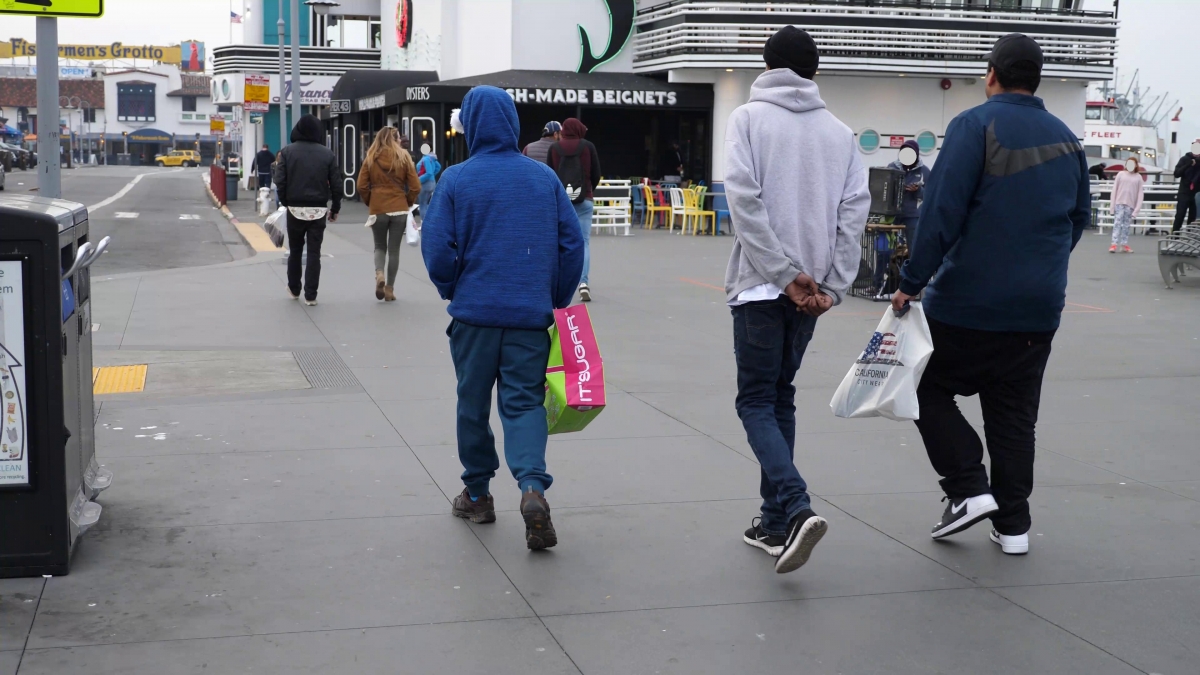
Output:
Output Type(s): Label(s), Bounding-Box(es), Confidence Scores
Output Format: Label: Text String(s); Bounding Box: (x-coordinate, y-coordinate, width, height), Confidence Scores: Floating Point
Other Properties Related to Output: Category Label(s): Bag, Face, Person, Bounding Box Coordinates, Confidence Scores
Output image

Software Integration:
Runtime Engine(s):
- TAO 5.1
- DeepStream 6.1 or later
Supported Hardware Architecture Compatibility:
- Ampere
- Jetson
- Hopper
- Lovelace
- Pascal
- Turing
Preferred Operating System(s):
- Linux
- Linux 4 Tegra
Model versions
- trainable_v2.5 - Unpruned ResNet34 based pre-trained floating-point model. Intended for transfer learning.
- pruned_v2.3 - Pruned ResNet34 floating point deployment model intended for applications with limited computational budget.
- pruned_quantized_v2.3 – Pruned ResNet34 INT8 deployment models including deployments on DLA. Contains calibration cache and can be used to run inference on GPU as well as Jetson AGX Xavier or Xavier NX DLA. Intended for applications with limited computational budget.
- deployable_quantized_v2.5 – Unpruned ResNet34 deployment models including floating point and INT8 deployments on GPU and DLA. Contains calibration cache and can be used to run inference on GPU as well as Jetson AGX Xavier or Xavier NX DLA. Intended for applications requiring best accuracy.
Training
- Data Collection Method by dataset
- Automatic/Sensors
- Labeling Method by dataset:
- Human
This model was trained using the DetectNet_v2 entrypoint in TAO. The training algorithm optimizes the network to minimize the localization and confidence loss for the objects. The training is carried out in two phases. In the first phase, the network is trained without regularization. In the second phase the network is retrained using quantization-aware training (QAT).
Training Data Properties
Internal, proprietary dataset in excess of 7.6 million images of more than 71 million people. The training dataset consists of a mix of cameras, camera heights, crowd-density, and field-of view (FOV) taken from a camera. Approximately half of the training data consisted of images captured in an indoor office environment. The camera is typically set up at approximately 10 feet height, 45-degree angle and has close field-of-view. This was done to improve accuracy of the models for convenience-store retail analytics use-case. We have also added approximately 500 thousand images with low-density scenes with people extending their hands and feet to improve the performance for use-cases where person object detection is followed by pose-estimation.
| Training | Dataset | Object | Distribution | |
|---|---|---|---|---|
| Category | Number of Images | Number of Persons | Number of Bags | Number of Faces |
| Natural | 4804552 | 23085430 | 8061920 | 10786381 |
| Rotated | 5746323 | 19930535 | 7234679 | 10094039 |
| Broadcast | 566408 | 566408 | 0 | 358518 |
| Broadcast Rotated | 369895 | 369895 | 0 | 59104 |
| Blended | 24841 | 26041 | 11225 | 0 |
| Blended Rotated | 24335 | 24523 | 9707 | 0 |
| Simulation | 27417 | 368914 | 0 | 92916 |
| Total | 7656570 | 41334979 | 12280764 | 18354191 |
Training Data Ground-truth Labeling Guidelines
The training dataset is created by labeling ground-truth bounding-boxes and categories by human labellers. Following guidelines were used while labelling the training data for NVIDIA PeopleNet model. If you are looking to re-train with your own dataset, please follow the guideline below for highest accuracy.
PeopleNet project labelling guidelines:
-
All objects that fall under one of the three classes (person, face, bag) in the image and are larger than the smallest bounding-box limit for the corresponding class (height >= 10px OR width >= 10px @1920x1080) are labeled with the appropriate class label.
-
If a person is carrying an object please mark the bounding-box to include the carried object as long as it doesn’t affect the silhouette of the person. For example, exclude a rolling bag if they are pulling it behind them and are distinctly visible as separate object. But include a backpack, purse etc. that do not alter the silhouette of the pedestrian significantly.
-
Occlusion: For partially occluded objects that do not belong a person class and are visible approximately 60% or are marked as visible objects with bounding box around visible part of the object. These objects are marked as partially occluded. Objects under 60% visibility are not annotated.
-
Occlusion for person class: If an occluded person’s head and shoulders are visible and the visible height is approximately 20% or more, then these objects are marked by the bounding box around the visible part of the person object. If the head and shoulders are not visible please follow the Occlusion guidelines in item 3 above.
-
Truncation: For an object other than a person that is at the edge of the frame with visibility of 60% or more visible are marked with the truncation flag for the object.
-
Truncation for person class: If a truncated person’s head and shoulders are visible and the visible height is approximately 20% or more mark the bounding box around the visible part of the person object. If the head and shoulders are not visible please follow the Truncation guidelines in item 5 above.
-
Each frame is not required to have an object.
Performance
Evaluation Data Properties
- Data Collection Method by dataset
- Automatic/Sensors
- Labeling Method by dataset:
- Human
90000 images from an Internal, proprietary dataset in excess of 7.6 million images of more than 71 million people. The training dataset consists of a mix of cameras, camera heights, crowd-density, and field-of view (FOV) taken from a camera. Approximately half of the training data consisted of images captured in an indoor office environment. The camera is typically set up at approximately 10 feet height, 45-degree angle and has close field-of-view. This was done to improve accuracy of the models for convenience-store retail analytics use-case. We have also added approximately 500 thousand images with low-density scenes with people extending their hands and feet to improve the performance for use-cases where person object detection is followed by pose-estimation.
Methodology and KPI
The true positives, false positives, false negatives are calculated using intersection-over-union (IOU) criterion greater than 0.5. In addition, we have also added KPI with IOU criterion of greater than 0.8 for low-density and extended-hand sequences where tight bounding box is a requirement for subsequent human pose estimation algorithms. The KPI for the evaluation data are reported in the table below. Model is evaluated based on precision, recall and accuracy.
| Network | PeopleNet | V2.6 | FP16 | PeopleNet | V2.6 | INT8 |
|---|---|---|---|---|---|---|
| Content | Precision | Recall | Accuracy | Precision | Recall | Accuracy |
| Generic | 91.82 | 88.60 | 82.17 | 92.97 | 85.33 | 80.21 |
| Office | 95.64 | 91.92 | 88.22 | 96.08 | 89.48 | 86.33 |
| Café | 93.38 | 86.97 | 81.92 | 94.62 | 81.81 | 78.18 |
| People (IOU > 0.8) | 80.41 | 78.13 | 65.71 | 78.71 | 73.90 | 61.68 |
| Extended-hands (IOU > 0.8) | 93.98 | 86.82 | 82.25 | 94.41 | 86.80 | 82.55 |
Real-time Inference Performance
The inference is run on the provided unpruned model at INT8 precision. The inference performance is run using trtexec on Jetson AGX Xavier, Xavier NX, Orin, Orin NX and NVIDIA T4, and Ampere GPU. The Jetson devices are running at Max-N configuration for maximum GPU frequency. The performance shown here is the inference only performance. The end-to-end performance with streaming video data might slightly vary depending on other bottlenecks in the hardware and software.
| Model Arch | Version | Inference Resolution | Precision | Xavier NX | AGX Xavier | ||
|---|---|---|---|---|---|---|---|
| PeopleNet | Unpruned | 960x544x3 | INT8 | GPU | DLA1+DLA2 | GPU | DLA1+DLA2 |
| Resnet34 | v2.6 | 79 | 46 | 136 | 58 |
| Model Arch | Version | Inference Resolution | Precision | Orin NX | AGX Orin | ||
|---|---|---|---|---|---|---|---|
| PeopleNet | Unpruned | 960x544x3 | INT8 | GPU | DLA1+DLA2 | GPU | DLA1+DLA2 |
| Resnet34 | v2.6 | 140 | 70 | 421 | 104 |
| Model Arch | Version | Inference Resolution | Precision | T4 | A100 | A30 | A10 | A2 |
|---|---|---|---|---|---|---|---|---|
| PeopleNet | Unpruned | 960x544x3 | INT8 | GPU | GPU | GPU | GPU | GPU |
| Resnet34 | v2.6 | 465 | 3291 | 1603 | 1007 | 231 |
How to use this model
These models need to be used with NVIDIA Hardware and Software. For Hardware, the models can run on any NVIDIA GPU including NVIDIA Jetson devices. These models can only be used with Train Adapt Optimize (TAO) Toolkit, DeepStream SDK or TensorRT.
The primary use case intended for these models is detecting people in a color (RGB) image. The model can be used to detect people from photos and videos by using appropriate video or image decoding and pre-processing. As a secondary use case the model can also be used to detect bags and faces from images or videos. However, these additional classes are not the main intended use for these models.
There are two flavors of these models:
- trainable (unpruned)
- deployable (unpruned quantized)
The trainable or unpruned models intended for training using TAO Toolkit and the user's own dataset. This can provide high fidelity models that are adapted to the use case. The Jupyter notebook available as a part of TAO container can be used to re-train.
The deployable_quantized models share the same structure as the trainable or unpruned model, however, these models have been trained by employing Quantization Aware Training and is intended for int-8 deployment.
The trainable (unpruned), deployable (unpruned quantized) models are encrypted and will only operate with the following key:
- Model load key:
tlt_encode
Please make sure to use this as the key for all TAO commands that require a model load key.
Instructions to use unpruned model with TAO
In order, to use these models as a pretrained weights for transfer learning, please use the snippet below as template for the model_config component of the experiment spec file to train a DetectNet_v2 model. For more information on the experiment spec file, please refer to the TAO Toolkit User Guide.
- For ResNet34
model_config {
  num_layers: 34
  pretrained_model_file: "/path/to/the/model.tlt"
  use_batch_norm: true
  objective_set {
    bbox {
      scale: 35.0
      offset: 0.5
    }
    cov {
    }
  }
  training_precision {
    backend_floatx: FLOAT32
  }
  arch: "resnet"
  all_projections: true
}
Instructions to deploy these models with DeepStream
To create the entire end-to-end video analytics application, deploy this model with DeepStream SDK. DeepStream SDK is a streaming analytics toolkit to accelerate deployment of AI-based video analytics applications. The pruned model included here can be integrated directly into deepstream by following the instructions mentioned below.
-
Run the default
deepstream-appincluded in the DeepStream docker, by simply executing the commands below.## Download Model: mkdir -p $HOME/peoplenet && \ wget https://api.ngc.nvidia.com/v2/models/nvidia/tao/peoplenet/versions/pruned_v2.1/files/resnet34_peoplenet_pruned.etlt \ -O $HOME/peoplenet/resnet34_peoplenet_pruned.etlt ## Run Application xhost + sudo docker run --gpus all -it --rm -v /tmp/.X11-unix:/tmp/.X11-unix -e DISPLAY=$DISPLAY -v $HOME:/opt/nvidia/deepstream/deepstream-5.1/samples/models/tlt_pretrained_models \ -w /opt/nvidia/deepstream/deepstream-5.1/samples/configs/tlt_pretrained_models nvcr.io/nvidia/deepstream:5.1-21.02-samples \ deepstream-app -c deepstream_app_source1_peoplenet.txt -
Install deepstream on your local host and run the deepstream-app.
Download and install DeepStream SDK. The installation instructions for DeepStream are provided in DeepStream development guide. The config files for the purpose-built models are located in:
/opt/nvidia/deepstream/deepstream-5.1/samples/configs/tlt_pretrained_models/opt/nvidia/deepstreamis the default DeepStream installation directory. This path will be different if you are installing in a different directory.You will need 2 config files and 1 label file. These files are provided in the
tlt_pretrained_modelsdirectory.deepstream_app_source1_peoplenet.txt - Main config file for DeepStream app config_infer_primary_peoplenet.txt - File to configure inference settings labels_peoplenet.txt - Label file with 3 classesKey Parameters in
config_infer_primary_peoplenet.txttlt-model-key= tlt-encoded-model= labelfile-path= int8-calib-file= input-dims= num-detected-classes=Run
deepstream-app:deepstream-app -c deepstream_app_source1_peoplenet.txtDocumentation to deploy with DeepStream is provided in "Deploying to DeepStream" chapter of TAO User Guide.
Limitations
Very Small Objects
NVIDIA PeopleNet model were trained to detect objects larger than 10x10 pixels. Therefore it may not be able to detect objects that are smaller than 10x10 pixels.
Occluded Objects
When objects are occluded or truncated such that less than 20% of the object is visible, they may not be detected by the PeopleNet model. For people class objects, the model will detect occluded people as long as head and shoulders are visible. However if the person’s head and/or shoulders are not visible, the object might not be detected unless more than 60% of the person is visible.
Dark-lighting, Monochrome or Infrared Camera Images
The PeopleNet model were trained on RGB images in good lighting conditions. Therefore, images captured in dark lighting conditions or a monochrome image or IR camera image may not provide good detection results.
Warped and Blurry Images
The PeopleNet models were not trained on fish-eye lense cameras or moving cameras. Therefore, the models may not perform well for warped images and images that have motion-induced or other blur.
Face and Bag class
Although bag and face class are included in the model, the accuracy of these classes will be much lower than people class. Some re-training will be required on these classes to improve accuracy.
Technical blogs
- Train like a ‘pro’ without being an AI expert using TAO AutoML
- Create Custom AI models using NVIDIA TAO Toolkit with Azure Machine Learning
- Developing and Deploying AI-powered Robots with NVIDIA Isaac Sim and NVIDIA TAO
- Learn endless ways to adapt and supercharge your AI workflows with TAO - Whitepaper
- Customize Action Recognition with TAO and deploy with DeepStream
- Read the 2 part blog on training and optimizing 2D body pose estimation model with TAO - Part 1 | Part 2
- Learn how to train real-time License plate detection and recognition app with TAO and DeepStream.
- Model accuracy is extremely important, learn how you can achieve state of the art accuracy for classification and object detection models using TAO
Suggested reading
- More information on about TAO Toolkit and pre-trained models can be found at the NVIDIA Developer Zone
- TAO documentation
- Read the TAO getting Started guide and release notes.
- If you have any questions or feedback, please refer to the discussions on TAO Toolkit Developer Forums
- Deploy your models for video analytics application using DeepStream. Learn more about DeepStream SDK
- Deploy your models in Riva for ConvAI use case.
License
License to use these models is covered by the Model EULA. By downloading the unpruned or pruned version of the model, you accept the terms and conditions of NVIDIA Open Model License.
Ethical Considerations
NVIDIA PeopleNet model detects faces. However, no additional information such as race, gender, and skin type about the faces is inferred.
Training and evaluation dataset mostly consists of North American content. An ideal training and evaluation dataset would additionally include content from other geographies.
NVIDIA’s platforms and application frameworks enable developers to build a wide array of AI applications. Consider potential algorithmic bias when choosing or creating the models being deployed. Work with the model’s developer to ensure that it meets the requirements for the relevant industry and use case; that the necessary instruction and documentation are provided to understand error rates, confidence intervals, and results; and that the model is being used under the conditions and in the manner intended.