
A Helm chart for deploying DOCA Argus service that utilizes Bluefield DPU for real-time, hardware-level memory forensics, ensuring robust, integrated security for AI workloads and microservices without impacting performance or requiring host agents.
Introduction
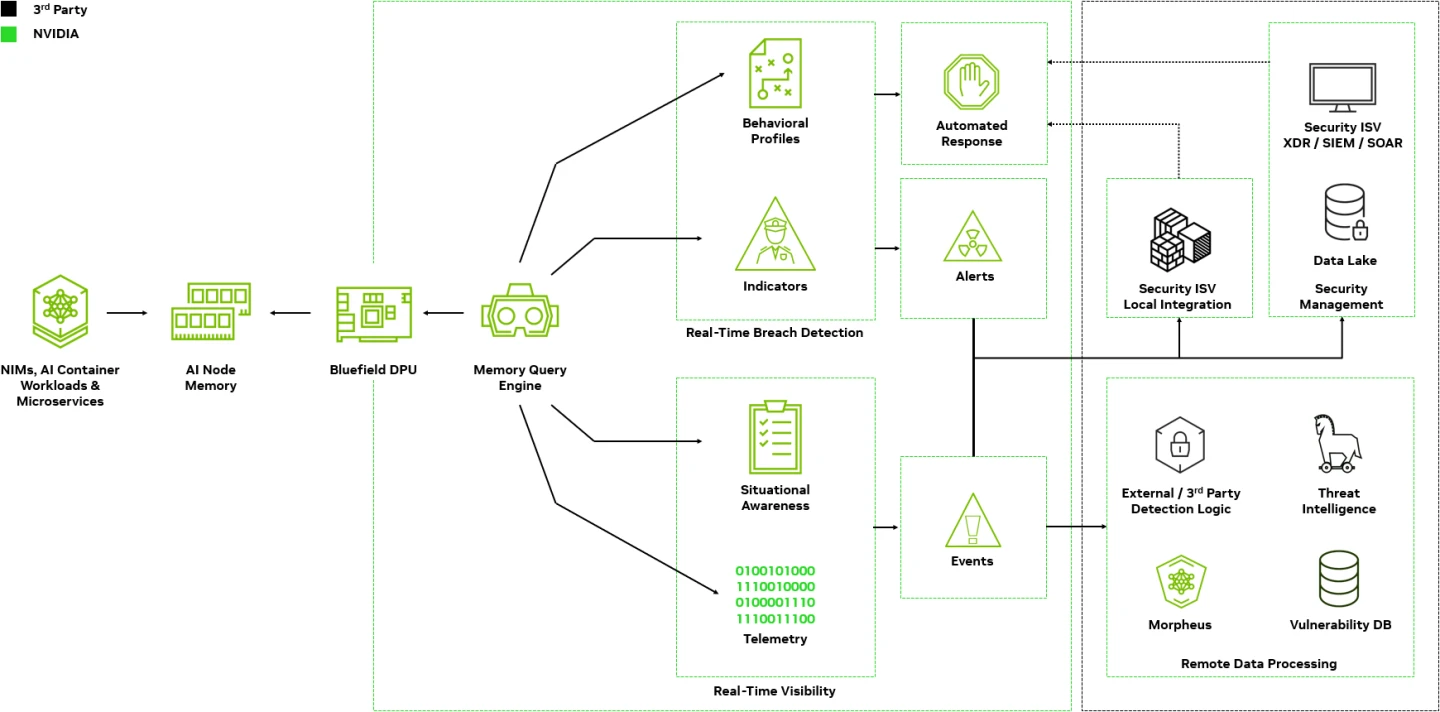
DOCA Argus - uses Bluefield DPU for real-time hardware-level memory forensics, ensuring robust, integrated security for AI workloads and microservices without impacting performance or requiring agents.
DOCA Argus service will provide events and data on any object on the OS (host/VM/container) without host configuration needed and without any active part from the user or the host - agentless, transparent, offloaded, and accelerated. Argus will provide for example event on: Any new process with its PID, name, attributes and status. Any reversed shell connection with its source & target IP, transferred bytes count, and port protocol.
Installation and Getting Started
Install Helm
For installing Helm, refer to the official helm website.
Preparation steps for the DOCA Service
As explained in the service's DOCA Argus Documentation, there are some resource allocation steps needed before the service can be executed. It is recommended to go over the service's user guide and follow the instructions that match the DPU on which the service will be deployed.
Install Argus service
Install the chart as follows:
helm fetch https://helm.ngc.nvidia.com/nvidia/doca/charts/doca-argus-1.0.0.tgz --untar
helm install doca-argus doca-argus
Documentation
The DOCA Argus Service Guide is available DOCA Argus Service Guide.
License & EULA
This DOCA Microservice is licensed under the NVIDIA Networking Product Agreement. By pulling and using this product, you accept the terms and conditions of this license.
Technical Support
Use the NVIDIA Developers forum for questions regarding this Software.