
DOCA UROM Service is an instance of the service framework for offloading High-Performance Computing computations directly from the host and to the DPU. Running on the DPU and responsible for discovering resources, managing the workers, etc.
Introduction
The DOCA UROM service runs inside of its own Kubernetes pod on BlueField and is an instance of the service framework running on the DPU and it is responsible for the discovery of resources, coordination between the host and DPU, and managing the workers. The service framework can support multiple implementations, we anticipate one implementation that supports multiple offloads.
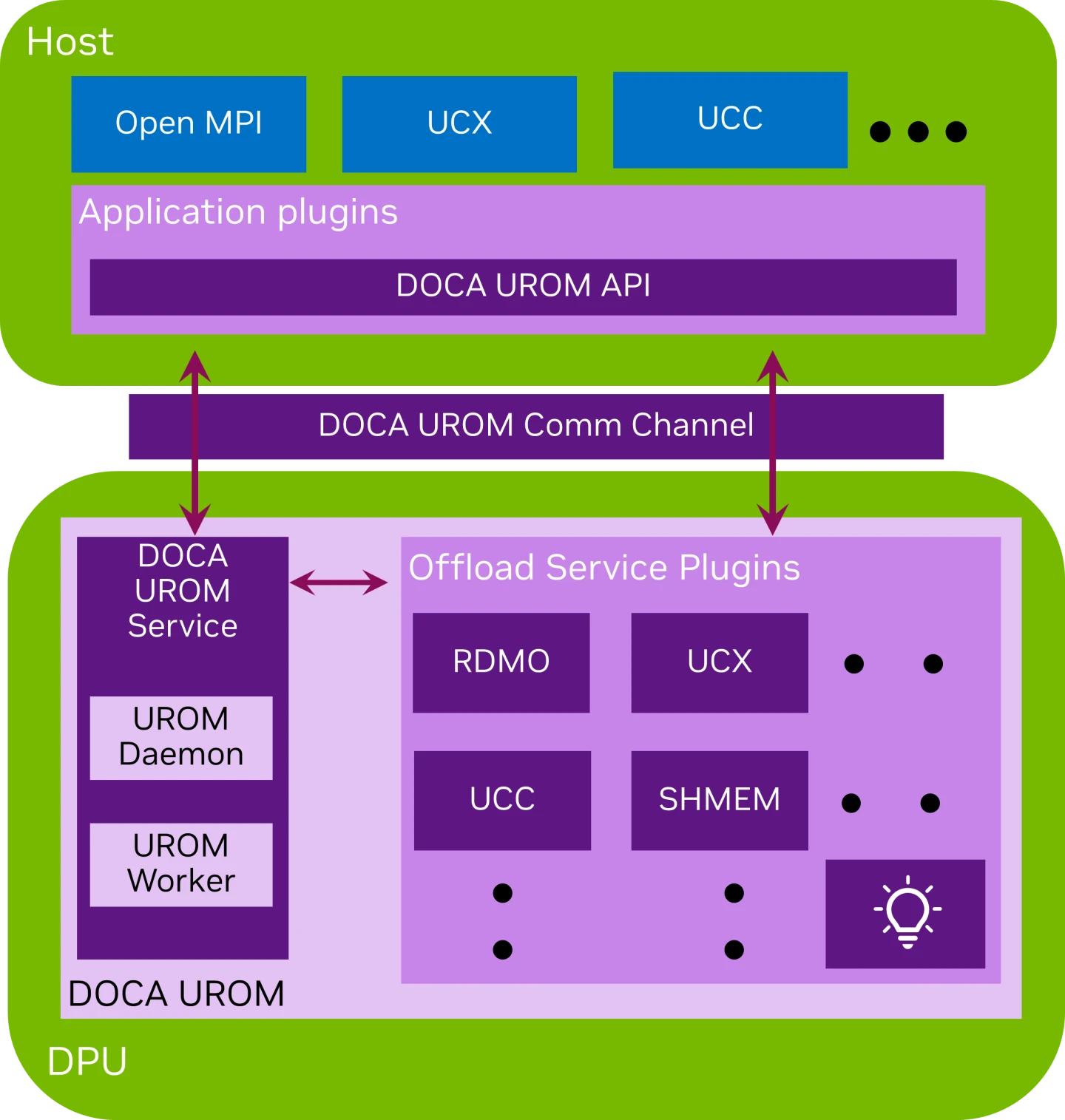
Installation and Getting Started
All preparation steps are listed under DOCA's Container Deployment User Guide.
Note: The DOCA Service container is configured for K8S-based deployment, hence the use of the docker pull command is discouraged.
Preparation steps for the DOCA Service
Allocate hugepages
echo 2048 > /sys/kernel/mm/hugepages/hugepages-2048kB/nr_hugepages
mkdir /mnt/huge
mount -t hugetlbfs nodev /mnt/huge
Adjusting the .yaml configuration
The .yaml configuration for our container is doca_urom.yaml:
wget https://api.ngc.nvidia.com/v2/resources/nvidia/doca/doca_container_configs/versions/2.7.0v2/files/configs/2.7.0/doca_urom.yaml
Note: The file is also stored with the rest of the .yaml configurations as were pulled from NGC in the previous steps (See "Installation and Getting Started").
The .yaml file can be easily edited according to ones needs.
The UROM_PLUGIN_PATH is an env variable that stores directory paths to .so files for the plugins.
For each plugin on the DPU, it is necessary to add a volume mount inside the service container, see the Sandbox plugin mount follows.
  volumes:
      # Shared host <-> container folder for the service
      # Incase of errors, make sure the folders exist
      - name: urom-sandbox-plugin
        hostPath:
          path: /opt/mellanox/doca/samples/doca_urom/plugins/worker_sandbox
          type: DirectoryOrCreate
    . . .

    volumeMounts:
        - mountPath: /opt/mellanox/doca/samples/doca_urom/plugins/worker_sandbox
          name: urom-sandbox-plugin
    . . .
    env:
      # Service-Specific command line arguments
      - name: SERVICE_ARGS
        value: "-l 60"
      - name: UROM_PLUGIN_PATH
        value: "/opt/mellanox/doca/samples/doca_urom/plugins/worker_sandbox/;/opt/mellanox/doca/samples/doca_urom/plugins/worker_graph/"
-l, --log-level <value> – sets the (numeric) log level for the program <10=DISABLE, 20=CRITICAL, 30=ERROR, 40=WARNING, 50=INFO, 60=DEBUG, 70=TRACE>
--sdk-log-level – sets the SDK (numeric) log level for the program <10=DISABLE, 20=CRITICAL, 30=ERROR, 40=WARNING, 50=INFO, 60=DEBUG, 70=TRACE>
-m, --max-msg-size – specify UROM communication channel maximum message size
Spawning the container
Simply copy the updated doca_urom.yaml file to the /etc/kubelet.d directory. Kubelet will automatically pull the container image from NGC, and spawn a pod executing the container. The DOCA UROM Service will start running immediately.
# View currently active pods, and their IDs (it might take up to 20 seconds for the pod to start)
crictl pods

# View currently active containers, and their IDs
crictl ps

# Examine logs of a given container
crictl logs

# Examine kubelet logs, in case something didn't work as expected
journalctl -u kubelet
Please refer to the documentation for more information.
Documentation
The DOCA UROM Service guide is available here.
License & EULA
DOCA is licensed under the NVIDIA DOCA License. By pulling and using the container, you accept the terms and conditions of this license.
Technical Support
Use the NVIDIA Developers forum for questions regarding this Software.