
ResNet with bottleneck 3x3 Convolutions substituted by 3x3 Grouped Convolutions.
The performance measurements in this document were conducted at the time of publication and may not reflect the performance achieved from NVIDIA's latest software release. For the most up-to-date performance measurements, go to NVIDIA Data Center Deep Learning Product Performance.
Benchmarking
The following section shows how to run benchmarks measuring the model performance in training and inference modes.
Training performance benchmark
To benchmark the training performance on a specific batch size, run:
-
For 1 GPU
-
FP32 / TF32
python ./main.py --arch=resnext101-32x4d --mode=training_benchmark --warmup_steps 200 --batch_size <batch size> --data_dir=<path to imagenet> --results_dir=<path to results directory> -
AMP
python ./main.py --arch=resnext101-32x4d --mode=training_benchmark --amp --warmup_steps 200 --batch_size <batch size> --data_dir=<path to imagenet> --results_dir=<path to results directory>
-
-
For multiple GPUs
-
FP32 / TF32
mpiexec --allow-run-as-root --bind-to socket -np <num_gpus> python ./main.py --arch=resnext101-32x4d --mode=training_benchmark --batch_size <batch size> --data_dir=<path to imagenet> --results_dir=<path to results directory> -
AMP
mpiexec --allow-run-as-root --bind-to socket -np <num_gpus> python ./main.py --arch=resnext101-32x4d --mode=training_benchmark --amp --batch_size <batch size> --data_dir=<path to imagenet> --results_dir=<path to results directory>
-
Each of these scripts runs 200 warm-up iterations and measures the first epoch.
To control warmup and benchmark length, use the --warmup_steps, --num_iter and --iter_unit flags. Features like XLA or DALI can be controlled
with --xla and --dali flags. For proper throughput reporting the value of --num_iter must be greater than --warmup_steps value.
Suggested batch sizes for training are 128 for mixed precision training and 64 for single precision training per single V100 16 GB.
If no --data_dir=<path to imagenet> flag is specified then the benchmarks will use a synthetic dataset. The resolution of synthetic images used can be controlled with --synthetic_data_size flag.
Inference performance benchmark
To benchmark the inference performance on a specific batch size, run:
- FP32 / TF32
python ./main.py --arch=resnext101-32x4d --mode=inference_benchmark --warmup_steps 20 --num_iter 100 --iter_unit batch --batch_size <batch size> --data_dir=<path to imagenet> --results_dir=<path to results directory>
- AMP
python ./main.py --arch=resnext101-32x4d --mode=inference_benchmark --amp --warmup_steps 20 --num_iter 100 --iter_unit batch --batch_size <batch size> --data_dir=<path to imagenet> --results_dir=<path to results directory>
By default, each of these scripts runs 20 warm-up iterations and measures the next 80 iterations.
To control warm-up and benchmark length, use the --warmup_steps, --num_iter and --iter_unit flags.
If no --data_dir=<path to imagenet> flag is specified then the benchmarks will use a synthetic dataset.
The benchmark can be automated with the inference_benchmark.sh script provided in resnext101-32x4d, by simply running:
bash ./resnext101-32x4d/inference_benchmark.sh <data dir> <data idx dir>
The <data dir> parameter refers to the input data directory (by default /data/tfrecords inside the container).
By default, the benchmark tests the following configurations: FP32, AMP, AMP + XLA with different batch sizes.
When the optional directory with the DALI index files <data idx dir> is specified, the benchmark executes an additional DALI + AMP + XLA configuration.
For proper throughput reporting the value of --num_iter must be greater than --warmup_steps value.
For performance benchamrk of raw model, synthetic dataset can be used. To use synthetic dataset, use --synthetic_data_size flag instead of --data_dir to specify input image size.
Results
The following sections provide details on how we achieved our performance and accuracy in training and inference.
Training accuracy results
Training accuracy: NVIDIA DGX A100 (8x A100 40GB)
Our results were obtained by running the /resnet50v1.5/training/DGXA100_RN50_{PRECISION}_90E.sh
training script in the TensorFlow 20.06-tf1-py3 NGC container
NGC container on NVIDIA DGX A100 (8x A100 40GB) GPUs.
| Epochs | Batch Size / GPU | Accuracy - TF32 (top1) | Accuracy - mixed precision (top1) |
|---|---|---|---|
| 90 | 128 (TF32) / 256 (AMP) | 79.38 | 79.20 |
Training accuracy: NVIDIA DGX-1 (8x V100 16G)
Our results were obtained by running the /resnext101-32x4d/training/DGX1_RNxt101-32x4d_{PRECISION}_{EPOCHS}E.sh
training script in the TensorFlow 20.06-tf1-py3 NGC container
NGC container on NVIDIA DGX-1 with (8x V100 16G) GPUs.
| Epochs | Batch Size / GPU | Accuracy - FP32 | Accuracy - mixed precision |
|---|---|---|---|
| 90 | 64 (FP32) / 128 (AMP) | 79.35 | 79.30 |
| 250 | 64 (FP32) / 128 (AMP) | 80.21 | 80.21 |
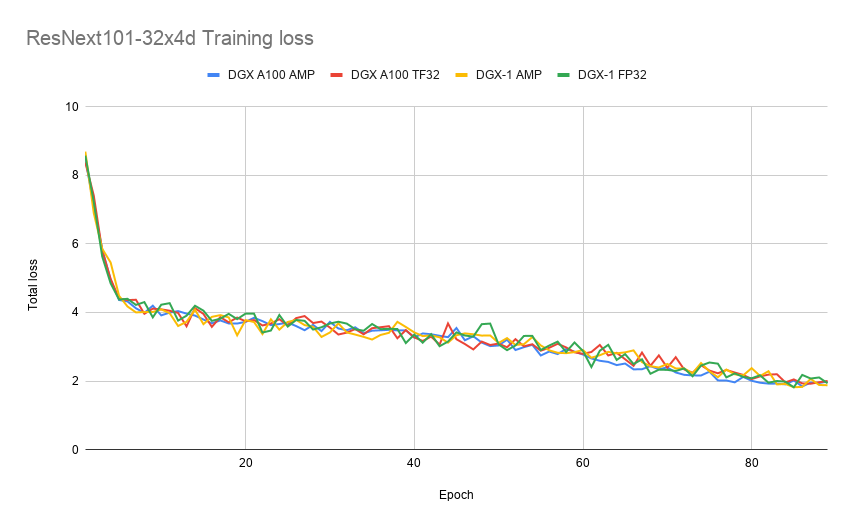
Example training loss plot
Training performance results
Training performance: NVIDIA DGX A100 (8x A100 40GB)
Our results were obtained by running the resnext101-32x4d/training/training_perf.sh benchmark script in the
TensorFlow 20.06-tf1-py3 NGC container NGC container
on NVIDIA DGX A100 (8x A100 40GB) GPUs. Performance numbers (in images per second) were averaged over an entire training epoch.
| GPUs | Batch Size / GPU | Throughput - TF32 + XLA | Throughput - mixed precision + XLA | Throughput speedup (TF32 - mixed precision) | Weak scaling - TF32 + XLA | Weak scaling - mixed precision + XLA |
|---|---|---|---|---|---|---|
| 1 | 128 (TF) / 256 (AMP) | 371 img/s | 1132 img/s | 3.05x | 1.00x | 1.00x |
| 8 | 128 (TF) / 256 (AMP) | 2854 img/s | 8500 img/s | 2.98x | 7.69x | 7.51x |
Training performance: NVIDIA DGX-1 (8x V100 16G)
Our results were obtained by running the resnext101-32x4d/training/training_perf.sh benchmark script in the
TensorFlow 20.06-tf1-py3 NGC container NGC container
on NVIDIA DGX-1 with (8x V100 16G) GPUs. Performance numbers (in images per second) were averaged over an entire training epoch.
| GPUs | Batch Size / GPU | Throughput - FP32 | Throughput - mixed precision | Throughput speedup (FP32 - mixed precision) | Weak scaling - FP32 | Weak scaling - mixed precision |
|---|---|---|---|---|---|---|
| 1 | 64 (FP32) / 128 (AMP) | 166 img/s | 566 img/s | 3.40x | 1.00x | 1.00x |
| 8 | 64 (FP32) / 128 (AMP) | 1210 img/s | 4160 img/s | 3.44x | 7.29x | 7.35x |
Training performance: NVIDIA DGX-2 (16x V100 32G)
Our results were obtained by running the resnext101-32x4d/training/training_perf.sh benchmark script in the
TensorFlow 20.06-tf1-py3 NGC container NGC container
on NVIDIA DGX-2 with (16x V100 32G) GPUs. Performance numbers (in images per second) were averaged over an entire training epoch.
| GPUs | Batch Size / GPU | Throughput - FP32 | Throughput - mixed precision | Throughput speedup (FP32 - mixed precision) | Weak scaling - FP32 | Weak scaling - mixed precision |
|---|---|---|---|---|---|---|
| 1 | 64 (FP32) / 128 (AMP) | 170 img/s | 572 img/s | 3.36x | 1.00x | 1.00x |
| 16 | 64 (FP32) / 128 (AMP) | 2500 img/s | 7750 img/s | 3.10x | 14.70x | 13.55x |
Training Time for 90 Epochs
Training time: NVIDIA DGX A100 (8x A100 40GB)
Our results were estimated based on the training performance results on NVIDIA DGX A100 with (8x A100 40G) GPUs.
| GPUs | Time to train - mixed precision + XLA | Time to train - TF32 + XLA |
|---|---|---|
| 1 | ~35h | ~94h |
| 8 | ~2h | ~5h |
Training time: NVIDIA DGX-1 (8x V100 16G)
Our results were estimated based on the training performance results on NVIDIA DGX-1 with (8x V100 16G) GPUs.
| GPUs | Time to train - mixed precision + XLA | Time to train - FP32 + XLA |
|---|---|---|
| 1 | ~56h | ~192h |
| 8 | ~8h | ~27h |
Training time: NVIDIA DGX-2 (16x V100 32G)
Our results were estimated based on the training performance results on NVIDIA DGX-2 with (16x V100 32G) GPUs.
| GPUs | Time to train - mixed precision + XLA | Time to train - FP32 + XLA |
|---|---|---|
| 1 | ~55h | ~188h |
| 16 | ~4h | ~12h |
Inference performance results
Inference performance: NVIDIA DGX A100 (1x A100 40GB)
Our results were obtained by running the inference_benchmark.sh inferencing benchmarking script
in the TensorFlow 20.06-tf1-py3 NGC container NGC container
on NVIDIA DGX A100 with (1x A100 40G) GPU.
TF32 Inference Latency
| Batch Size | Avg throughput | Avg latency | 90% Latency | 95% Latency | 99% Latency |
|---|---|---|---|---|---|
| 1 | 111.07 img/s | 9.04 ms | 9.05 ms | 9.10 ms | 9.45 ms |
| 2 | 200.35 img/s | 10.01 ms | 10.05 ms | 10.08 ms | 10.24 ms |
| 4 | 283.11 img/s | 14.15 ms | 14.36 ms | 14.43 ms | 14.65 ms |
| 8 | 416.93 img/s | 19.19 ms | 19.64 ms | 19.90 ms | 20.14 ms |
| 16 | 629.64 img/s | 25.44 ms | 25.82 ms | 25.97 ms | 26.51 ms |
| 32 | 766.57 img/s | 41.83 ms | 42.30 ms | 42.65 ms | 43.45 ms |
| 64 | 836.72 img/s | 76.50 ms | 77.07 ms | 77.44 ms | 78.72 ms |
| 128 | 864.37 img/s | 148.27 ms | 148.54 ms | 148.93 ms | 149.62 ms |
| 256 | 902.67 img/s | 283.60 ms | 284.57 ms | 285.02 ms | 285.74 ms |
TF32 Inference Latency + XLA
| Batch Size | Avg throughput | Avg latency | 90% Latency | 95% Latency | 99% Latency |
|---|---|---|---|---|---|
| 1 | 107.46 img/s | 9.34 ms | 9.36 ms | 9.40 ms | 9.95 ms |
| 2 | 192.54 img/s | 10.42 ms | 10.48 ms | 10.54 ms | 11.21 ms |
| 4 | 280.89 img/s | 14.26 ms | 14.41 ms | 14.53 ms | 14.94 ms |
| 8 | 387.41 img/s | 20.65 ms | 21.19 ms | 21.37 ms | 21.74 ms |
| 16 | 676.19 img/s | 23.67 ms | 24.34 ms | 24.55 ms | 25.61 ms |
| 32 | 902.44 img/s | 35.46 ms | 36.22 ms | 36.40 ms | 37.00 ms |
| 64 | 1028.06 img/s | 62.34 ms | 63.46 ms | 64.38 ms | 72.65 ms |
| 128 | 1096.39 img/s | 116.80 ms | 118.10 ms | 118.82 ms | 121.00 ms |
| 256 | 1153.50 img/s | 221.93 ms | 223.18 ms | 223.49 ms | 223.90 ms |
Mixed Precision Inference Latency
| Batch Size | Avg throughput | Avg latency | 90% Latency | 95% Latency | 99% Latency |
|---|---|---|---|---|---|
| 1 | 127.96 img/s | 7.84 ms | 7.88 ms | 7.92 ms | 8.00 ms |
| 2 | 243.62 img/s | 8.24 ms | 8.28 ms | 8.31 ms | 8.58 ms |
| 4 | 491.02 img/s | 8.18 ms | 8.36 ms | 8.43 ms | 8.99 ms |
| 8 | 952.95 img/s | 8.40 ms | 8.80 ms | 8.94 ms | 9.31 ms |
| 16 | 1625.38 img/s | 9.85 ms | 10.19 ms | 10.45 ms | 10.86 ms |
| 32 | 1991.14 img/s | 16.22 ms | 16.46 ms | 16.78 ms | 17.59 ms |
| 64 | 2138.11 img/s | 30.08 ms | 31.02 ms | 31.34 ms | 32.27 ms |
| 128 | 2140.59 img/s | 59.81 ms | 61.37 ms | 61.77 ms | 62.53 ms |
| 256 | 2185.86 img/s | 117.12 ms | 118.35 ms | 118.72 ms | 119.84 ms |
Mixed Precision Inference Latency + XLA
| Batch Size | Avg throughput | Avg latency | 90% Latency | 95% Latency | 99% Latency |
|---|---|---|---|---|---|
| 1 | 86.02 img/s | 11.66 ms | 11.78 ms | 11.82 ms | 12.18 ms |
| 2 | 166.91 img/s | 12.01 ms | 12.10 ms | 12.14 ms | 12.25 ms |
| 4 | 330.75 img/s | 12.10 ms | 12.45 ms | 12.87 ms | 13.27 ms |
| 8 | 675.53 img/s | 11.84 ms | 12.08 ms | 12.24 ms | 12.59 ms |
| 16 | 1234.52 img/s | 13.06 ms | 13.89 ms | 14.11 ms | 15.01 ms |
| 32 | 2501.78 img/s | 13.09 ms | 14.14 ms | 15.25 ms | 25.57 ms |
| 64 | 3049.35 img/s | 21.12 ms | 22.24 ms | 23.27 ms | 28.62 ms |
| 128 | 3324.24 img/s | 38.98 ms | 40.07 ms | 40.81 ms | 51.07 ms |
| 256 | 3166.28 img/s | 82.05 ms | 94.93 ms | 101.78 ms | 119.88 ms |
Inference performance: NVIDIA DGX-1 (1x V100 16G)
Our results were obtained by running the inference_benchmark.sh inferencing benchmarking script
in the TensorFlow 20.06-tf1-py3 NGC container NGC container
on NVIDIA DGX-1 with (1x V100 16G) GPU.
FP32 Inference Latency
| Batch Size | Avg throughput | Avg latency | 90% Latency | 95% Latency | 99% Latency |
|---|---|---|---|---|---|
| 1 | 98.34 img/s | 10.24 ms | 10.27 ms | 10.32 ms | 12.89 ms |
| 2 | 167.04 img/s | 11.98 ms | 12.17 ms | 12.24 ms | 12.59 ms |
| 4 | 214.18 img/s | 18.68 ms | 18.80 ms | 18.88 ms | 19.73 ms |
| 8 | 259.96 img/s | 30.78 ms | 31.04 ms | 31.08 ms | 31.44 ms |
| 16 | 350.71 img/s | 45.63 ms | 45.81 ms | 45.88 ms | 47.96 ms |
| 32 | 407.80 img/s | 78.74 ms | 78.66 ms | 79.04 ms | 110.32 ms |
| 64 | 461.88 img/s | 138.57 ms | 139.34 ms | 139.68 ms | 141.54 ms |
| 128 | 493.61 img/s | 259.57 ms | 260.38 ms | 260.84 ms | 262.40 ms |
Mixed Precision Inference Latency
| Batch Size | Avg throughput | Avg latency | 90% Latency | 95% Latency | 99% Latency |
|---|---|---|---|---|---|
| 1 | 84.74 img/s | 11.85 ms | 11.95 ms | 12.02 ms | 12.17 ms |
| 2 | 183.64 img/s | 10.94 ms | 11.08 ms | 11.18 ms | 11.36 ms |
| 4 | 359.91 img/s | 11.17 ms | 11.35 ms | 11.46 ms | 11.80 ms |
| 8 | 736.61 img/s | 10.87 ms | 11.17 ms | 11.31 ms | 11.46 ms |
| 16 | 1058.59 img/s | 15.22 ms | 15.30 ms | 15.47 ms | 16.51 ms |
| 32 | 1152.14 img/s | 28.03 ms | 27.99 ms | 28.11 ms | 29.55 ms |
| 64 | 1275.35 img/s | 50.38 ms | 50.41 ms | 50.52 ms | 51.39 ms |
| 128 | 1347.11 img/s | 95.02 ms | 95.51 ms | 95.70 ms | 96.29 ms |
Mixed Precision Inference Latency + XLA
| Batch Size | Avg throughput | Avg latency | 90% Latency | 95% Latency | 99% Latency |
|---|---|---|---|---|---|
| 1 | 59.84 img/s | 16.77 ms | 16.95 ms | 17.00 ms | 17.23 ms |
| 2 | 120.41 img/s | 16.66 ms | 16.90 ms | 16.97 ms | 17.21 ms |
| 4 | 242.75 img/s | 16.48 ms | 16.96 ms | 17.10 ms | 17.55 ms |
| 8 | 466.47 img/s | 17.15 ms | 17.50 ms | 17.65 ms | 17.94 ms |
| 16 | 861.72 img/s | 18.69 ms | 19.19 ms | 19.33 ms | 19.68 ms |
| 32 | 1472.21 img/s | 22.06 ms | 22.32 ms | 22.82 ms | 23.91 ms |
| 64 | 1728.76 img/s | 37.24 ms | 37.49 ms | 37.65 ms | 38.08 ms |
| 128 | 1892.97 img/s | 67.62 ms | 68.24 ms | 68.49 ms | 69.47 ms |
Inference performance: NVIDIA DGX-2 (1x V100 32G)
Our results were obtained by running the inference_benchmark.sh inferencing benchmarking script
in the TensorFlow 20.06-tf1-py3 NGC container NGC container
on NVIDIA DGX-2 with (1x V100 32G) GPU.
FP32 Inference Latency
| Batch Size | Avg throughput | Avg latency | 90% Latency | 95% Latency | 99% Latency |
|---|---|---|---|---|---|
| 1 | 96.91 img/s | 10.38 ms | 10.46 ms | 10.53 ms | 11.32 ms |
| 2 | 163.02 img/s | 12.33 ms | 12.54 ms | 12.77 ms | 13.45 ms |
| 4 | 206.76 img/s | 19.35 ms | 19.52 ms | 19.63 ms | 20.09 ms |
| 8 | 249.68 img/s | 32.05 ms | 32.24 ms | 32.31 ms | 33.26 ms |
| 16 | 330.36 img/s | 48.43 ms | 48.63 ms | 48.69 ms | 49.03 ms |
| 32 | 399.97 img/s | 80.00 ms | 80.44 ms | 80.62 ms | 81.28 ms |
| 64 | 481.88 img/s | 132.94 ms | 133.05 ms | 133.16 ms | 133.71 ms |
| 128 | 519.85 img/s | 246.22 ms | 247.09 ms | 247.71 ms | 250.49 ms |
Mixed Precision Inference Latency
| Batch Size | Avg throughput | Avg latency | 90% Latency | 95% Latency | 99% Latency |
|---|---|---|---|---|---|
| 1 | 108.86 img/s | 9.24 ms | 9.36 ms | 9.42 ms | 9.57 ms |
| 2 | 215.01 img/s | 9.36 ms | 9.42 ms | 9.46 ms | 9.68 ms |
| 4 | 422.09 img/s | 9.48 ms | 9.70 ms | 9.80 ms | 10.10 ms |
| 8 | 791.52 img/s | 10.12 ms | 10.24 ms | 10.32 ms | 10.58 ms |
| 16 | 1064.30 img/s | 15.16 ms | 15.27 ms | 15.32 ms | 17.23 ms |
| 32 | 1190.90 img/s | 27.11 ms | 27.00 ms | 27.10 ms | 27.97 ms |
| 64 | 1319.63 img/s | 48.49 ms | 48.73 ms | 48.82 ms | 49.32 ms |
| 128 | 1397.36 img/s | 91.60 ms | 91.93 ms | 92.07 ms | 92.61 ms |
Mixed Precision Inference Latency + XLA
| Batch Size | Avg throughput | Avg latency | 90% Latency | 95% Latency | 99% Latency |
|---|---|---|---|---|---|
| 1 | 76.34 img/s | 13.16 ms | 13.37 ms | 13.49 ms | 13.74 ms |
| 2 | 150.90 img/s | 13.31 ms | 13.54 ms | 13.61 ms | 13.87 ms |
| 4 | 284.88 img/s | 14.10 ms | 15.28 ms | 15.38 ms | 15.68 ms |
| 8 | 587.77 img/s | 13.61 ms | 13.87 ms | 13.94 ms | 14.06 ms |
| 16 | 1089.95 img/s | 14.80 ms | 14.91 ms | 15.04 ms | 15.46 ms |
| 32 | 1503.51 img/s | 21.55 ms | 21.33 ms | 21.38 ms | 21.91 ms |
| 64 | 1765.86 img/s | 36.47 ms | 36.39 ms | 36.51 ms | 37.15 ms |
| 128 | 2003.04 img/s | 63.91 ms | 64.95 ms | 65.07 ms | 65.47 ms |
Inference performance: NVIDIA T4 (1x T4 16G)
Our results were obtained by running the inference_benchmark.sh inferencing benchmarking script
in the TensorFlow 20.06-tf1-py3 NGC container NGC container
on NVIDIA T4 with (1x T4 16G) GPU.
FP32 Inference Latency
| Batch Size | Avg throughput | Avg latency | 90% Latency | 95% Latency | 99% Latency |
|---|---|---|---|---|---|
| 1 | 31.92 img/s | 31.42 ms | 31.58 ms | 31.78 ms | 37.56 ms |
| 2 | 45.62 img/s | 43.92 ms | 44.83 ms | 45.80 ms | 46.99 ms |
| 4 | 70.42 img/s | 56.80 ms | 57.14 ms | 57.47 ms | 59.30 ms |
| 8 | 85.68 img/s | 93.36 ms | 93.66 ms | 93.76 ms | 94.15 ms |
| 16 | 99.58 img/s | 160.65 ms | 160.91 ms | 161.39 ms | 162.34 ms |
| 32 | 105.04 img/s | 304.63 ms | 305.53 ms | 305.96 ms | 307.22 ms |
| 64 | 108.31 img/s | 590.85 ms | 591.31 ms | 591.70 ms | 593.23 ms |
| 128 | 110.05 img/s | 1163.04 ms | 1163.52 ms | 1163.75 ms | 1164.24 ms |
Mixed Precision Inference Latency
| Batch Size | Avg throughput | Avg latency | 90% Latency | 95% Latency | 99% Latency |
|---|---|---|---|---|---|
| 1 | 80.61 img/s | 12.50 ms | 12.56 ms | 12.66 ms | 13.54 ms |
| 2 | 104.47 img/s | 19.23 ms | 19.73 ms | 19.92 ms | 20.68 ms |
| 4 | 143.68 img/s | 27.91 ms | 28.42 ms | 28.71 ms | 29.47 ms |
| 8 | 176.65 img/s | 45.29 ms | 45.93 ms | 46.15 ms | 46.75 ms |
| 16 | 203.55 img/s | 78.60 ms | 78.95 ms | 79.25 ms | 79.74 ms |
| 32 | 209.77 img/s | 152.54 ms | 153.41 ms | 153.75 ms | 154.82 ms |
| 64 | 222.97 img/s | 287.03 ms | 287.91 ms | 288.27 ms | 289.56 ms |
| 128 | 226.19 img/s | 565.89 ms | 566.21 ms | 566.38 ms | 567.52 ms |
Mixed Precision Inference Latency + XLA
| Batch Size | Avg throughput | Avg latency | 90% Latency | 95% Latency | 99% Latency |
|---|---|---|---|---|---|
| 1 | 54.68 img/s | 18.40 ms | 19.17 ms | 19.34 ms | 19.53 ms |
| 2 | 102.20 img/s | 19.67 ms | 20.37 ms | 20.55 ms | 24.65 ms |
| 4 | 153.96 img/s | 26.05 ms | 26.31 ms | 27.01 ms | 28.96 ms |
| 8 | 177.98 img/s | 44.94 ms | 45.25 ms | 45.43 ms | 45.66 ms |
| 16 | 237.70 img/s | 67.31 ms | 68.35 ms | 68.87 ms | 69.63 ms |
| 32 | 241.79 img/s | 132.34 ms | 133.18 ms | 133.87 ms | 134.92 ms |
| 64 | 263.80 img/s | 242.60 ms | 244.25 ms | 245.27 ms | 246.56 ms |
| 128 | 272.17 img/s | 470.29 ms | 471.29 ms | 471.78 ms | 473.61 ms |