
The NCF model focuses on providing recommendations. This is a modified implementation with improved overfitting and better accuracy.
The performance measurements in this document were conducted at the time of publication and may not reflect the performance achieved from NVIDIA's latest software release. For the most up-to-date performance measurements, go to NVIDIA Data Center Deep Learning Product Performance.
Benchmarking
Training performance benchmark
NCF training on NVIDIA DGX systems is very fast; therefore, in order to measure train and validation throughput, you can simply run the full training job with:
./prepare_dataset.sh
python -m torch.distributed.launch --nproc_per_node=8 --use_env ncf.py --data /data/cache/ml-20m --epochs 5
At the end of the script, a line reporting the best train throughput is printed.
Inference performance benchmark
Validation throughput can be measured by running the full training job with:
./prepare_dataset.sh
python -m torch.distributed.launch --nproc_per_node=8 --use_env ncf.py --data /data/cache/ml-20m --epochs 5
The best validation throughput is reported to the standard output.
Results
The following sections provide details on how we achieved our performance and accuracy in training and inference.
Training accuracy results
Training accuracy: NVIDIA DGX A100(8x A100 40GB)
Our results were obtained by following the steps in the Quick Start Guide in the PyTorch 21.04-py3 NGC container on NVIDIA DGX A100 (8x A100 40GB) GPUs.
The following table lists the best hit rate at 10 for DGX A100 with 8 A100 40GB GPUs. It also shows the time to reach this HR@10. Results are averages across 20 random seeds.
| GPUs | Batch size / GPU | Accuracy - TF32 | Accuracy - mixed precision | Time to train - TF32 | Time to train - mixed precision | Time to train speedup (TF32 to mixed precision) |
|---|---|---|---|---|---|---|
| 1 | 1048576 | 0.958925 | 0.958892 | 140.771 | 94.2386 | 1.49 |
| 8 | 131072 | 0.958938 | 0.959089 | 30.0928 | 23.7362 | 1.27 |
Training accuracy: NVIDIA DGX-1 (8x V100 16GB)
Our results were obtained by following the steps in the Quick Start Guide in the PyTorch 21.04-py3 NGC container on NVIDIA DGX-1 with 8x V100 16GB GPUs.
The following table lists the best hit rate at 10 for DGX-1 with 8 V100 16GB GPUs. It also shows the time to reach this HR@10. Results are averages across 20 random seeds. The training time was measured excluding data downloading, preprocessing, validation data generation and library initialization times.
| GPUs | Batch size / GPU | Accuracy - FP32 | Accuracy - mixed precision | Time to train - FP32 | Time to train - mixed precision | Time to train speedup (FP32 to mixed precision) |
|---|---|---|---|---|---|---|
| 1 | 1048576 | 0.958857 | 0.958815 | 302.443 | 145.423 | 2.08 |
| 8 | 131072 | 0.958768 | 0.959052 | 53.7044 | 34.2503 | 1.57 |
To reproduce this result, start the NCF Docker container interactively and run:
./prepare_dataset.sh
python -m torch.distributed.launch --nproc_per_node=8 --use_env ncf.py --data /data/cache/ml-20m
Training accuracy: NVIDIA DGX-1 (8x V100 32GB)
Our results were obtained by following the steps in the Quick Start Guide in the PyTorch 21.04-py3 NGC container on NVIDIA DGX-1 with 8x V100 32GB GPUs.
The following table lists the best hit rate at 10 for DGX-1 with 8 V100 32GB GPUs. It also shows the time to reach this HR@10. Results are averages across 20 random seeds. The training time was measured excluding data downloading, preprocessing, validation data generation and library initialization times.
| GPUs | Batch size / GPU | Accuracy - FP32 | Accuracy - mixed precision | Time to train - FP32 | Time to train - mixed precision | Time to train speedup (FP32 to mixed precision) |
|---|---|---|---|---|---|---|
| 1 | 1048576 | 0.958992 | 0.959002 | 310.467 | 153.616 | 2.02 |
| 8 | 131072 | 0.95871 | 0.958925 | 55.716 | 36.3384 | 1.53 |
To reproduce this result, start the NCF Docker container interactively and run:
./prepare_dataset.sh
python -m torch.distributed.launch --nproc_per_node=8 --use_env ncf.py --data /data/cache/ml-20m
Training accuracy: NVIDIA DGX-2 (16x V100 32GB)
Our results were obtained by following the steps in the Quick Start Guide in the PyTorch 21.04-py3 NGC container on NVIDIA DGX-2 with 16x V100 32GB GPUs.
The following table lists the best hit rate at 10 for DGX-2 with 16 V100 32GB GPUs. It also shows the time to reach this HR@10. Results are averages across 20 random seeds. The training time was measured excluding data downloading, preprocessing, validation data generation and library initialization times.
| GPUs | Batch size / GPU | Accuracy - FP32 | Accuracy - mixed precision | Time to train - FP32 | Time to train - mixed precision | Time to train speedup (FP32 to mixed precision) |
|---|---|---|---|---|---|---|
| 1 | 1048576 | 0.958756 | 0.958833 | 289.004 | 143.61 | 2.01 |
| 8 | 131072 | 0.958864 | 0.958806 | 52.1788 | 33.7456 | 1.55 |
| 16 | 65536 | 0.958905 | 0.958893 | 37.7075 | 27.174 | 1.39 |
To reproduce this result, start the NCF Docker container interactively and run:
./prepare_dataset.sh
python -m torch.distributed.launch --nproc_per_node=16 --use_env ncf.py --data /data/cache/ml-20m
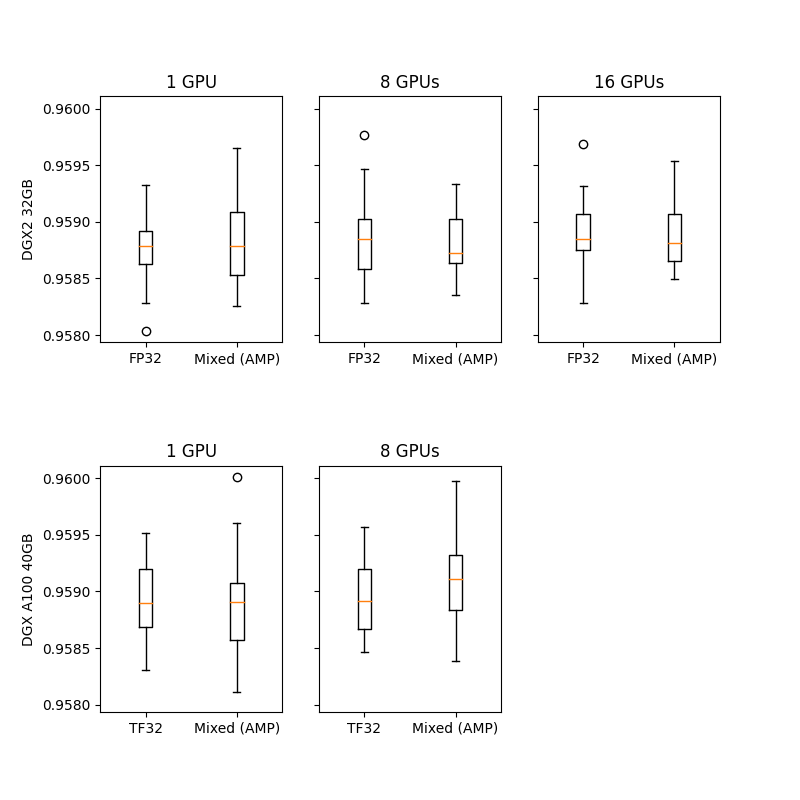
Influence of AMP on accuracy
The box plots below show the best accuracy achieved in each run. Twenty experiments were performed for each configuration.
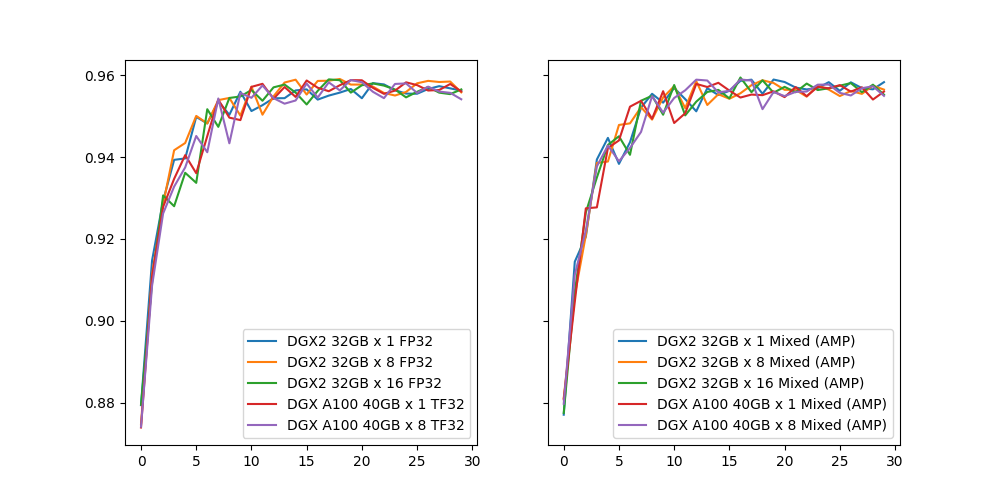
Training validation curves
The plots below show the validation accuracy over the course of training. One sample curve is shown for each configuration.
Training performance results
Results are averages over 20 runs for each configuration.
Training performance: NVIDIA DGX A100 (8x A100 40GB)
Our results were obtained by following the steps in the Quick Start Guide in the PyTorch 21.04-py3 NGC container on NVIDIA DGX A100 (8x A100 40GB) GPUs. Performance numbers (in items per second) were averaged over an entire training epoch.
| GPUs | Batch size / GPU | Throughput - TF32 (samples/s) | Throughput - mixed precision (samples/s) | Throughput speedup (TF32 to mixed precision) | Strong scaling - TF32 | Strong scaling - mixed precision |
|---|---|---|---|---|---|---|
| 1 | 1048576 | 22.59M | 34.08M | 0.66 | 1 | 1 |
| 8 | 131072 | 110.16M | 142.90M | 0.77 | 4.88 | 4.19 |
Training performance: NVIDIA DGX-1 (8x V100 16GB)
Our results were obtained by following the steps in the Quick Start Guide in the PyTorch 21.04-py3 NGC container on NVIDIA DGX-1 with 8x V100 16GB GPUs.
The following table shows the best training throughput:
| GPUs | Batch size / GPU | Throughput - FP32 (samples/s) | Throughput - mixed precision (samples/s) | Throughput speedup (FP32 to mixed precision) | Strong scaling - FP32 | Strong scaling - mixed precision |
|---|---|---|---|---|---|---|
| 1 | 1048576 | 10.42M | 21.84M | 0.48 | 1 | 1 |
| 8 | 131072 | 60.03M | 95.95M | 0.63 | 5.76 | 4.39 |
Training performance: NVIDIA DGX-1 (8x V100 32GB)
Our results were obtained by following the steps in the Quick Start Guide in the PyTorch 21.04-py3 NGC container on NVIDIA DGX-1 with 8x V100 32GB GPUs.
The following table shows the best training throughput:
| GPUs | Batch size / GPU | Throughput - FP32 (samples/s) | Throughput - mixed precision (samples/s) | Throughput speedup (FP32 to mixed precision) | Strong scaling - FP32 | Strong scaling - mixed precision |
|---|---|---|---|---|---|---|
| 1 | 1048576 | 10.14M | 20.65M | 0.49 | 1 | 1 |
| 8 | 131072 | 58.50M | 91.77M | 0.64 | 5.77 | 4.44 |
Training performance: NVIDIA DGX-2 (16x V100 32GB)
Our results were obtained by following the steps in the Quick Start Guide in the PyTorch 21.04-py3 NGC container on NVIDIA DGX-2 with 16x V100 32GB GPUs.
The following table shows the best training throughput:
| GPUs | Batch size / GPU | Throughput - FP32 (samples/s) | Throughput - mixed precision (samples/s) | Throughput speedup (FP32 to mixed precision) | Strong scaling - FP32 | Strong scaling - mixed precision |
|---|---|---|---|---|---|---|
| 1 | 1048576 | 10.90M | 22.16M | 0.49 | 1 | 1 |
| 8 | 131072 | 62.16M | 98.56M | 0.63 | 5.7 | 4.45 |
| 16 | 65536 | 92.20M | 134.91M | 0.68 | 8.46 | 6.09 |
Inference performance results
Inference performance: NVIDIA DGX A100 (1x A100 40GB)
Our results were obtained by running the inference.py script in the PyTorch 21.04 NGC container on NVIDIA DGX A100 with 1x A100 GPU.
TF32
| Batch size | Throughput Avg | Latency Avg | Latency 90% | Latency 95% | Latency 99% |
|---|---|---|---|---|---|
| 1024 | 2.96198e+06 | 0.000346 | 0.00037 | 0.000374 | 0.000383 |
| 4096 | 1.16823e+07 | 0.000351 | 0.000375 | 0.000382 | 0.000389 |
| 16384 | 4.01876e+07 | 0.000408 | 0.000442 | 0.000443 | 0.000445 |
| 65536 | 5.06161e+07 | 0.001295 | 0.001319 | 0.001321 | 0.001324 |
| 262144 | 5.62193e+07 | 0.004663 | 0.004655 | 0.00466 | 0.005091 |
| 1048576 | 5.74678e+07 | 0.018246 | 0.018258 | 0.018261 | 0.018276 |
FP16
| Batch size | Throughput Avg | Latency Avg | Latency 90% | Latency 95% | Latency 99% |
|---|---|---|---|---|---|
| 1024 | 2.9068e+06 | 0.000352 | 0.000379 | 0.000383 | 0.000401 |
| 4096 | 1.1149e+07 | 0.000367 | 0.000394 | 0.000396 | 0.000402 |
| 16384 | 4.46873e+07 | 0.000367 | 0.000391 | 0.000397 | 0.000406 |
| 65536 | 7.15357e+07 | 0.000916 | 0.001064 | 0.001068 | 0.001071 |
| 262144 | 8.02216e+07 | 0.003268 | 0.00327 | 0.003272 | 0.00338 |
| 1048576 | 8.27085e+07 | 0.012678 | 0.012685 | 0.012688 | 0.012809 |
Inference performance: NVIDIA DGX-1 (1x V100 16GB)
Our results were obtained by running the inference.py script in the PyTorch 21.04 NGC container on NVIDIA DGX-1 with 1x V100 16GB GPU.
FP32
| Batch size | Throughput Avg | Latency Avg | Latency 90% | Latency 95% | Latency 99% |
|---|---|---|---|---|---|
| 1024 | 1.91315e+06 | 0.000535 | 0.000557 | 0.000565 | 0.000589 |
| 4096 | 7.4782e+06 | 0.000548 | 0.000566 | 0.000577 | 0.000718 |
| 16384 | 2.15241e+07 | 0.000761 | 0.000783 | 0.000791 | 0.000842 |
| 65536 | 2.77005e+07 | 0.002366 | 0.00242 | 0.002431 | 0.002435 |
| 262144 | 2.95251e+07 | 0.008879 | 0.008888 | 0.008895 | 0.008932 |
| 1048576 | 2.92491e+07 | 0.03585 | 0.03603 | 0.036078 | 0.036144 |
FP16
| Batch size | Throughput Avg | Latency Avg | Latency 90% | Latency 95% | Latency 99% |
|---|---|---|---|---|---|
| 1024 | 2.00172e+06 | 0.000512 | 0.000538 | 0.000546 | 0.000577 |
| 4096 | 8.08797e+06 | 0.000506 | 0.000519 | 0.000535 | 0.000569 |
| 16384 | 3.22482e+07 | 0.000508 | 0.000516 | 0.000519 | 0.000557 |
| 65536 | 5.20587e+07 | 0.001259 | 0.001265 | 0.001267 | 0.001278 |
| 262144 | 5.66404e+07 | 0.004628 | 0.004636 | 0.004638 | 0.004642 |
| 1048576 | 5.66507e+07 | 0.018509 | 0.018547 | 0.018556 | 0.018583 |