Collection of Jupyter Notebooks illustrating how Torch-TensorRT can optimize inference with several well-known deep learning models

Torch-TensorRT Getting Started - EfficientNet-B0
Overview
In the practice of developing machine learning models, there are few tools as approachable as PyTorch for developing and experimenting in designing machine learning models. The power of PyTorch comes from its deep integration into Python, its flexibility and its approach to automatic differentiation and execution (eager execution). However, when moving from research into production, the requirements change and we may no longer want that deep Python integration and we want optimization to get the best performance we can on our deployment platform. In PyTorch 1.0, TorchScript was introduced as a method to separate your PyTorch model from Python, make it portable and optimizable. TorchScript uses PyTorch's JIT compiler to transform your normal PyTorch code which gets interpreted by the Python interpreter to an intermediate representation (IR) which can have optimizations run on it and at runtime can get interpreted by the PyTorch JIT interpreter. For PyTorch this has opened up a whole new world of possibilities, including deployment in other languages like C++. It also introduces a structured graph based format that we can use to do down to the kernel level optimization of models for inference.
When deploying on NVIDIA GPUs TensorRT, NVIDIA's Deep Learning Optimization SDK and Runtime is able to take models from any major framework and specifically tune them to perform better on specific target hardware in the NVIDIA family be it an A100, TITAN V, Jetson Xavier or NVIDIA's Deep Learning Accelerator. TensorRT performs a couple sets of optimizations to achieve this. TensorRT fuses layers and tensors in the model graph, it then uses a large kernel library to select implementations that perform best on the target GPU. TensorRT also has strong support for reduced operating precision execution which allows users to leverage the Tensor Cores on Volta and newer GPUs as well as reducing memory and computation footprints on device.
Torch-TensorRT is a compiler that uses TensorRT to optimize TorchScript code, compiling standard TorchScript modules into ones that internally run with TensorRT optimizations. This enables you to continue to remain in the PyTorch ecosystem, using all the great features PyTorch has such as module composability, its flexible tensor implementation, data loaders and more. Torch-TensorRT is available to use with both PyTorch and LibTorch.
Learning objectives
This notebook demonstrates the steps for compiling a TorchScript module with Torch-TensorRT on a pretrained EfficientNet network, and running it to test the speedup obtained.
Content
Looking in indexes: https://pypi.org/simple, https://pypi.ngc.nvidia.com
Collecting timm==0.4.12
Downloading timm-0.4.12-py3-none-any.whl (376 kB)
[K |████████████████████████████████| 376 kB 11.9 MB/s eta 0:00:01
[?25hRequirement already satisfied: torch>=1.4 in /opt/conda/lib/python3.8/site-packages (from timm==0.4.12) (1.11.0a0+bfe5ad2)
Requirement already satisfied: torchvision in /opt/conda/lib/python3.8/site-packages (from timm==0.4.12) (0.12.0a0)
Requirement already satisfied: typing_extensions in /opt/conda/lib/python3.8/site-packages (from torch>=1.4->timm==0.4.12) (4.0.1)
Requirement already satisfied: pillow!=8.3.*,>=5.3.0 in /opt/conda/lib/python3.8/site-packages (from torchvision->timm==0.4.12) (8.2.0)
Requirement already satisfied: numpy in /opt/conda/lib/python3.8/site-packages (from torchvision->timm==0.4.12) (1.22.0)
Installing collected packages: timm
Successfully installed timm-0.4.12
[33mWARNING: Running pip as the 'root' user can result in broken permissions and conflicting behaviour with the system package manager. It is recommended to use a virtual environment instead: https://pip.pypa.io/warnings/venv[0m
Fri Feb 4 21:29:36 2022
+-----------------------------------------------------------------------------+
| NVIDIA-SMI 510.39.01 Driver Version: 510.39.01 CUDA Version: 11.6 |
|-------------------------------+----------------------+----------------------+
| GPU Name Persistence-M| Bus-Id Disp.A | Volatile Uncorr. ECC |
| Fan Temp Perf Pwr:Usage/Cap| Memory-Usage | GPU-Util Compute M. |
| | | MIG M. |
|===============================+======================+======================|
| 0 NVIDIA GeForce ... On | 00000000:65:00.0 Off | N/A |
| 30% 28C P8 11W / 350W | 0MiB / 24576MiB | 0% Default |
| | | N/A |
+-------------------------------+----------------------+----------------------+
+-----------------------------------------------------------------------------+
| Processes: |
| GPU GI CI PID Type Process name GPU Memory |
| ID ID Usage |
|=============================================================================|
| No running processes found |
+-----------------------------------------------------------------------------+
1. Requirements
NVIDIA's NGC provides PyTorch Docker Container which contains PyTorch and Torch-TensorRT. We can make use of latest pytorch container to run this notebook.
Otherwise, you can follow the steps in notebooks/README to prepare a Docker container yourself, within which you can run this demo notebook.
2. EfficientNet Overview
PyTorch has a model repository called timm, which is a source for high quality implementations of computer vision models. We can get our EfficientNet model from there pretrained on ImageNet.
Model Description
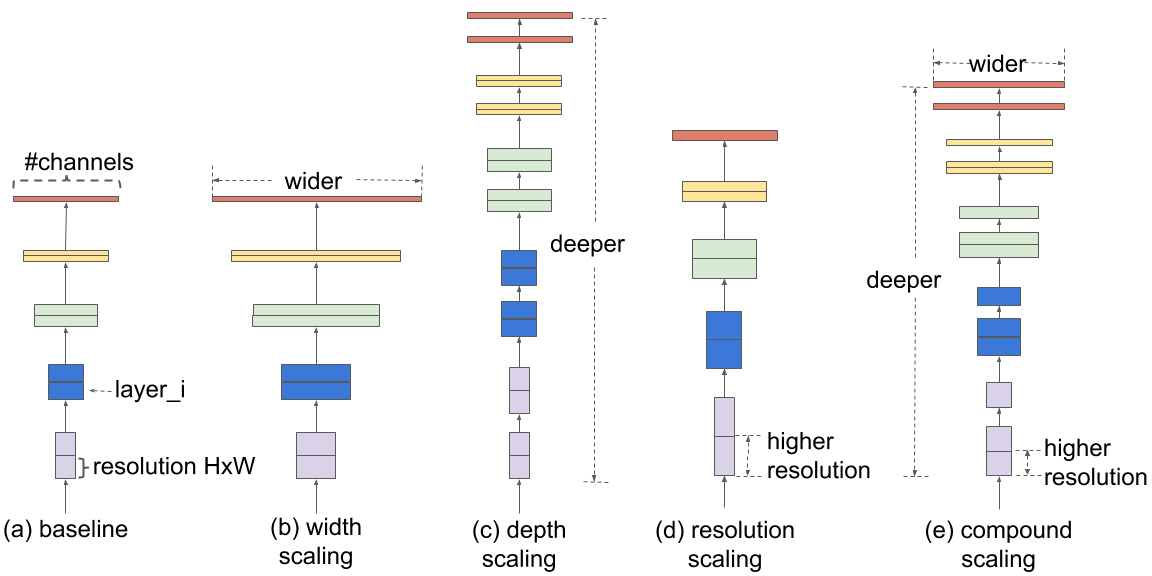
This model is based on the EfficientNet: Rethinking Model Scaling for Convolutional Neural Networks paper.
With our model loaded, let's proceed to downloading some images!
--2022-02-04 21:30:07--  https://d17fnq9dkz9hgj.cloudfront.net/breed-uploads/2018/08/siberian-husky-detail.jpg?bust=1535566590&width=630
Resolving d17fnq9dkz9hgj.cloudfront.net (d17fnq9dkz9hgj.cloudfront.net)... 18.65.227.127, 18.65.227.37, 18.65.227.99, ...
Connecting to d17fnq9dkz9hgj.cloudfront.net (d17fnq9dkz9hgj.cloudfront.net)|18.65.227.127|:443... connected.
HTTP request sent, awaiting response... 200 OK
Length: 24112 (24K) [image/jpeg]
Saving to: ‘./data/img0.JPG’

./data/img0.JPG     100%[===================>]  23.55K  --.-KB/s    in 0.004s

2022-02-04 21:30:07 (6.40 MB/s) - ‘./data/img0.JPG’ saved [24112/24112]

--2022-02-04 21:30:07--  https://www.hakaimagazine.com/wp-content/uploads/header-gulf-birds.jpg
Resolving www.hakaimagazine.com (www.hakaimagazine.com)... 164.92.73.117
Connecting to www.hakaimagazine.com (www.hakaimagazine.com)|164.92.73.117|:443... connected.
HTTP request sent, awaiting response... 200 OK
Length: 452718 (442K) [image/jpeg]
Saving to: ‘./data/img1.JPG’

./data/img1.JPG     100%[===================>] 442.11K  --.-KB/s    in 0.06s

2022-02-04 21:30:07 (6.83 MB/s) - ‘./data/img1.JPG’ saved [452718/452718]

--2022-02-04 21:30:08--  https://www.artis.nl/media/filer_public_thumbnails/filer_public/00/f1/00f1b6db-fbed-4fef-9ab0-84e944ff11f8/chimpansee_amber_r_1920x1080.jpg__1920x1080_q85_subject_location-923%2C365_subsampling-2.jpg
Resolving www.artis.nl (www.artis.nl)... 94.75.225.20
Connecting to www.artis.nl (www.artis.nl)|94.75.225.20|:443... connected.
HTTP request sent, awaiting response... 200 OK
Length: 361413 (353K) [image/jpeg]
Saving to: ‘./data/img2.JPG’

./data/img2.JPG     100%[===================>] 352.94K   246KB/s    in 1.4s

2022-02-04 21:30:10 (246 KB/s) - ‘./data/img2.JPG’ saved [361413/361413]

--2022-02-04 21:30:10--  https://www.familyhandyman.com/wp-content/uploads/2018/09/How-to-Avoid-Snakes-Slithering-Up-Your-Toilet-shutterstock_780480850.jpg
Resolving www.familyhandyman.com (www.familyhandyman.com)... 104.18.202.107, 104.18.201.107, 2606:4700::6812:ca6b, ...
Connecting to www.familyhandyman.com (www.familyhandyman.com)|104.18.202.107|:443... connected.
HTTP request sent, awaiting response... 200 OK
Length: 90994 (89K) [image/jpeg]
Saving to: ‘./data/img3.JPG’

./data/img3.JPG     100%[===================>]  88.86K  --.-KB/s    in 0.006s

2022-02-04 21:30:10 (14.4 MB/s) - ‘./data/img3.JPG’ saved [90994/90994]

--2022-02-04 21:30:11--  https://s3.amazonaws.com/deep-learning-models/image-models/imagenet_class_index.json
Resolving s3.amazonaws.com (s3.amazonaws.com)... 52.216.133.45
Connecting to s3.amazonaws.com (s3.amazonaws.com)|52.216.133.45|:443... connected.
HTTP request sent, awaiting response... 200 OK
Length: 35363 (35K) [application/octet-stream]
Saving to: ‘./data/imagenet_class_index.json’

./data/imagenet_cla 100%[===================>]  34.53K  --.-KB/s    in 0.07s

2022-02-04 21:30:11 (474 KB/s) - ‘./data/imagenet_class_index.json’ saved [35363/35363]
All pre-trained models expect input images normalized in the same way,
i.e. mini-batches of 3-channel RGB images of shape (3 x H x W), where H and W are expected to be at least 224.
The images have to be loaded in to a range of [0, 1] and then normalized using mean = [0.485, 0.456, 0.406]
and std = [0.229, 0.224, 0.225].
Here's a sample execution.

Throughout this tutorial, we will be making use of some utility functions; efficientnet_preprocess for preprocessing input images, predict to use the model for prediction and benchmark to benchmark the inference. You do not need to understand/go through these utilities to make use of Torch TensorRT, but are welecomed to do so if you choose.
With the model downloaded and the util functions written, let's just quickly see some predictions, and benchmark the model in its current un-optimized state.
/opt/conda/lib/python3.8/site-packages/torchvision/transforms/transforms.py:321: UserWarning: Argument interpolation should be of type InterpolationMode instead of int. Please, use InterpolationMode enum.
  warnings.warn(
./data/img0.JPG - Predicted: ['n02109961', 'Eskimo_dog'], Probablility: 0.3987298309803009
./data/img1.JPG - Predicted: ['n01537544', 'indigo_bunting'], Probablility: 0.23344755172729492
./data/img2.JPG - Predicted: ['n02481823', 'chimpanzee'], Probablility: 0.9695423245429993
./data/img3.JPG - Predicted: ['n01739381', 'vine_snake'], Probablility: 0.227739155292511

Warm up ...
Start timing ...
Iteration 10/100, avg batch time 37.62 ms
Iteration 20/100, avg batch time 37.66 ms
Iteration 30/100, avg batch time 37.65 ms
Iteration 40/100, avg batch time 37.66 ms
Iteration 50/100, avg batch time 37.70 ms
Iteration 60/100, avg batch time 37.70 ms
Iteration 70/100, avg batch time 37.70 ms
Iteration 80/100, avg batch time 37.71 ms
Iteration 90/100, avg batch time 37.72 ms
Iteration 100/100, avg batch time 37.72 ms
Input shape: torch.Size([128, 3, 224, 224])
Output features size: torch.Size([128, 1000])
Average throughput: 3393.46 images/second
Onwards to the next step, accelerating with Torch TensorRT. In these examples we showcase the results for FP32 (single precision) and FP16 (half precision). We do not demonstrat specific tuning, just showcase the simplicity of usage. If you want to learn more about the possible customizations, visit our documentation.
FP32 (single precision)
WARNING: [Torch-TensorRT] - Mean converter disregards dtype
WARNING: [Torch-TensorRT] - Mean converter disregards dtype
WARNING: [Torch-TensorRT] - Mean converter disregards dtype
WARNING: [Torch-TensorRT] - Mean converter disregards dtype
WARNING: [Torch-TensorRT] - Mean converter disregards dtype
WARNING: [Torch-TensorRT] - Mean converter disregards dtype
WARNING: [Torch-TensorRT] - Mean converter disregards dtype
WARNING: [Torch-TensorRT] - Mean converter disregards dtype
WARNING: [Torch-TensorRT] - Mean converter disregards dtype
WARNING: [Torch-TensorRT] - Mean converter disregards dtype
WARNING: [Torch-TensorRT] - Mean converter disregards dtype
WARNING: [Torch-TensorRT] - Mean converter disregards dtype
WARNING: [Torch-TensorRT] - Mean converter disregards dtype
WARNING: [Torch-TensorRT] - Mean converter disregards dtype
WARNING: [Torch-TensorRT] - Mean converter disregards dtype
WARNING: [Torch-TensorRT] - Mean converter disregards dtype
Warm up ...
Start timing ...
Iteration 10/100, avg batch time 27.86 ms
Iteration 20/100, avg batch time 27.71 ms
Iteration 30/100, avg batch time 27.99 ms
Iteration 40/100, avg batch time 27.95 ms
Iteration 50/100, avg batch time 27.89 ms
Iteration 60/100, avg batch time 27.85 ms
Iteration 70/100, avg batch time 28.00 ms
Iteration 80/100, avg batch time 27.97 ms
Iteration 90/100, avg batch time 27.95 ms
Iteration 100/100, avg batch time 27.92 ms
Input shape: torch.Size([128, 3, 224, 224])
Output features size: torch.Size([128, 1000])
Average throughput: 4584.06 images/second
FP16 (half precision)
WARNING: [Torch-TensorRT] - For input x.1, found user specified input dtype as Float16, however when inspecting the graph, the input type expected was inferred to be Float
The compiler is going to use the user setting Float16
This conflict may cause an error at runtime due to partial compilation being enabled and therefore
compatibility with PyTorch's data type convention is required.
If you do indeed see errors at runtime either:
- Remove the dtype spec for x.1
- Disable partial compilation by setting require_full_compilation to True
WARNING: [Torch-TensorRT] - Mean converter disregards dtype
WARNING: [Torch-TensorRT] - Mean converter disregards dtype
WARNING: [Torch-TensorRT] - Mean converter disregards dtype
WARNING: [Torch-TensorRT] - Mean converter disregards dtype
WARNING: [Torch-TensorRT] - Mean converter disregards dtype
WARNING: [Torch-TensorRT] - Mean converter disregards dtype
WARNING: [Torch-TensorRT] - Mean converter disregards dtype
WARNING: [Torch-TensorRT] - Mean converter disregards dtype
WARNING: [Torch-TensorRT] - Mean converter disregards dtype
WARNING: [Torch-TensorRT] - Mean converter disregards dtype
WARNING: [Torch-TensorRT] - Mean converter disregards dtype
WARNING: [Torch-TensorRT] - Mean converter disregards dtype
WARNING: [Torch-TensorRT] - Mean converter disregards dtype
WARNING: [Torch-TensorRT] - Mean converter disregards dtype
WARNING: [Torch-TensorRT] - Mean converter disregards dtype
WARNING: [Torch-TensorRT] - Mean converter disregards dtype
WARNING: [Torch-TensorRT TorchScript Conversion Context] - Tensor DataType is determined at build time for tensors not marked as input or output.
WARNING: [Torch-TensorRT TorchScript Conversion Context] - Tensor DataType is determined at build time for tensors not marked as input or output.
Warm up ...
Start timing ...
Iteration 10/100, avg batch time 12.05 ms
Iteration 20/100, avg batch time 12.56 ms
Iteration 30/100, avg batch time 12.39 ms
Iteration 40/100, avg batch time 12.34 ms
Iteration 50/100, avg batch time 12.33 ms
Iteration 60/100, avg batch time 12.32 ms
Iteration 70/100, avg batch time 12.30 ms
Iteration 80/100, avg batch time 12.28 ms
Iteration 90/100, avg batch time 12.35 ms
Iteration 100/100, avg batch time 12.35 ms
Input shape: torch.Size([128, 3, 224, 224])
Output features size: torch.Size([128, 1000])
Average throughput: 10362.23 images/second
5. Conclusion
In this notebook, we have walked through the complete process of compiling TorchScript models with Torch-TensorRT for EfficientNet-B0 model and test the performance impact of the optimization. With Torch-TensorRT, we observe a speedup of 1.35x with FP32, and 3.13x with FP16 on an NVIDIA 3090 GPU. These acceleration numbers will vary from GPU to GPU(as well as implementation to implementation based on the ops used) and we encorage you to try out latest generation of Data center compute cards for maximum acceleration.
What's next
Now it's time to try Torch-TensorRT on your own model. If you run into any issues, you can fill them at https://github.com/NVIDIA/Torch-TensorRT. Your involvement will help future development of Torch-TensorRT.