
With modified architecture and initialization this ResNet50 version gives ~0.5% better accuracy than original.
The performance measurements in this document were conducted at the time of publication and may not reflect the performance achieved from NVIDIA's latest software release. For the most up-to-date performance measurements, go to NVIDIA Data Center Deep Learning Product Performance.
Benchmarking
The following section shows how to run benchmarks measuring the model performance in training and inference modes.
Training performance benchmark
To benchmark training, run:
- For 1 GPU
- FP32 (V100 GPUs only)
python ./launch.py --model resnet50 --precision FP32 --mode benchmark_training --platform DGX1V <path to imagenet> --raport-file benchmark.json --epochs 1 --prof 100 - TF32 (A100 GPUs only)
python ./launch.py --model resnet50 --precision TF32 --mode benchmark_training --platform DGXA100 <path to imagenet> --raport-file benchmark.json --epochs 1 --prof 100 - AMP
python ./launch.py --model resnet50 --precision AMP --mode benchmark_training --platform <DGX1V|DGXA100> <path to imagenet> --raport-file benchmark.json --epochs 1 --prof 100
- FP32 (V100 GPUs only)
- For multiple GPUs
- FP32 (V100 GPUs only)
python ./launch.py --model resnet50 --precision FP32 --mode benchmark_training --platform DGX1V <path to imagenet> --raport-file benchmark.json --epochs 1 --prof 100 - TF32 (A100 GPUs only)
python ./multiproc.py --nproc_per_node 8 ./launch.py --model resnet50 --precision TF32 --mode benchmark_training --platform DGXA100 <path to imagenet> --raport-file benchmark.json --epochs 1 --prof 100 - AMP
python ./multiproc.py --nproc_per_node 8 ./launch.py --model resnet50 --precision AMP --mode benchmark_training --platform <DGX1V|DGXA100> <path to imagenet> --raport-file benchmark.json --epochs 1 --prof 100
- FP32 (V100 GPUs only)
Each of these scripts will run 100 iterations and save results in the benchmark.json file.
Inference performance benchmark
To benchmark inference, run:
- FP32 (V100 GPUs only)
python ./launch.py --model resnet50 --precision FP32 --mode benchmark_inference --platform DGX1V <path to imagenet> --raport-file benchmark.json --epochs 1 --prof 100
- TF32 (A100 GPUs only)
python ./launch.py --model resnet50 --precision TF32 --mode benchmark_inference --platform DGXA100 <path to imagenet> --raport-file benchmark.json --epochs 1 --prof 100
- AMP
python ./launch.py --model resnet50 --precision AMP --mode benchmark_inference --platform <DGX1V|DGXA100> <path to imagenet> --raport-file benchmark.json --epochs 1 --prof 100
Each of these scripts will run 100 iterations and save results in the benchmark.json file.
Results
Training accuracy results
Our results were obtained by running the applicable training script in the pytorch-20.12 NGC container.
To achieve these same results, follow the steps in the Quick Start Guide.
Training accuracy: NVIDIA DGX A100 (8x A100 80GB)
| Epochs | Mixed Precision Top1 | TF32 Top1 |
|---|---|---|
| 90 | 77.12 +/- 0.11 | 76.95 +/- 0.18 |
| 250 | 78.43 +/- 0.11 | 78.38 +/- 0.17 |
Training accuracy: NVIDIA DGX-1 (8x V100 16GB)
| Epochs | Mixed Precision Top1 | FP32 Top1 |
|---|---|---|
| 90 | 76.88 +/- 0.16 | 77.01 +/- 0.16 |
| 250 | 78.25 +/- 0.12 | 78.30 +/- 0.16 |
Training accuracy: NVIDIA DGX-2 (16x V100 32GB)
| epochs | Mixed Precision Top1 | FP32 Top1 |
|---|---|---|
| 50 | 75.81 +/- 0.08 | 76.04 +/- 0.05 |
| 90 | 77.10 +/- 0.06 | 77.23 +/- 0.04 |
| 250 | 78.59 +/- 0.13 | 78.46 +/- 0.03 |
Example plots
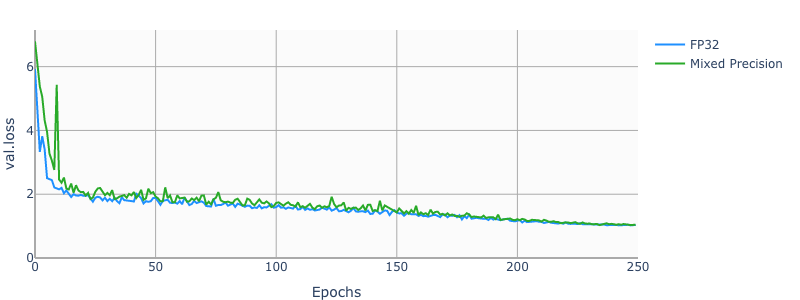
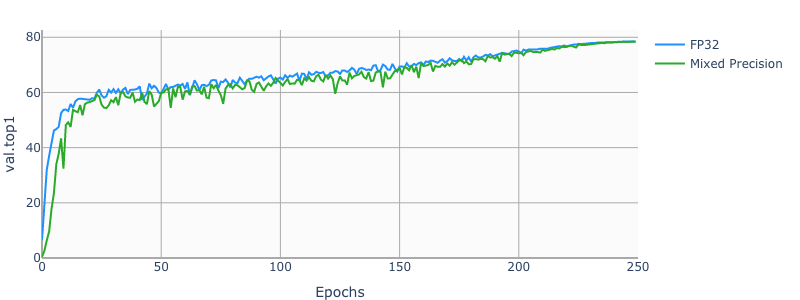
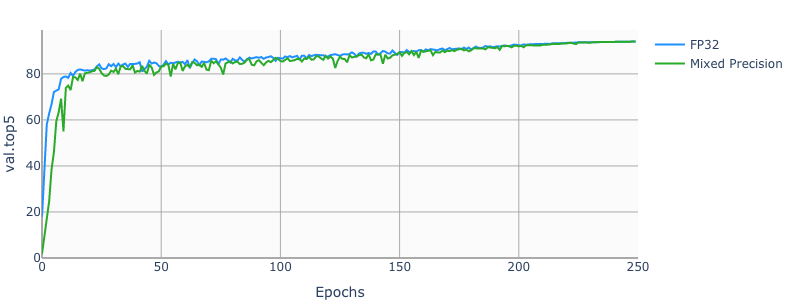
The following images show a 250 epochs configuration on a DGX-1V.
Training performance results
Our results were obtained by running the applicable training script in the pytorch-21.03 NGC container.
To achieve these same results, follow the steps in the Quick Start Guide.
Training performance: NVIDIA DGX A100 (8x A100 80GB)
| GPUs | Throughput - TF32 | Throughput - mixed precision | Throughput speedup (TF32 to mixed precision) | TF32 Strong Scaling | Mixed Precision Strong Scaling | Mixed Precision Training Time (90E) | TF32 Training Time (90E) |
|---|---|---|---|---|---|---|---|
| 1 | 938 img/s | 2470 img/s | 2.63 x | 1.0 x | 1.0 x | ~14 hours | ~36 hours |
| 8 | 7248 img/s | 16621 img/s | 2.29 x | 7.72 x | 6.72 x | ~3 hours | ~5 hours |
Training performance: NVIDIA DGX-1 16GB (8x V100 16GB)
| GPUs | Throughput - FP32 | Throughput - mixed precision | Throughput speedup (FP32 to mixed precision) | FP32 Strong Scaling | Mixed Precision Strong Scaling | Mixed Precision Training Time (90E) | FP32 Training Time (90E) |
|---|---|---|---|---|---|---|---|
| 1 | 367 img/s | 1200 img/s | 3.26 x | 1.0 x | 1.0 x | ~29 hours | ~92 hours |
| 8 | 2855 img/s | 8322 img/s | 2.91 x | 7.76 x | 6.93 x | ~5 hours | ~12 hours |
Training performance: NVIDIA DGX-1 32GB (8x V100 32GB)
| GPUs | Throughput - FP32 | Throughput - mixed precision | Throughput speedup (FP32 to mixed precision) | FP32 Strong Scaling | Mixed Precision Strong Scaling | Mixed Precision Training Time (90E) | FP32 Training Time (90E) |
|---|---|---|---|---|---|---|---|
| 1 | 356 img/s | 1156 img/s | 3.24 x | 1.0 x | 1.0 x | ~30 hours | ~95 hours |
| 8 | 2766 img/s | 8056 img/s | 2.91 x | 7.75 x | 6.96 x | ~5 hours | ~13 hours |
Inference performance results
Our results were obtained by running the applicable training script in the pytorch-21.03 NGC container.
To achieve these same results, follow the steps in the Quick Start Guide.
Inference performance: NVIDIA DGX-1 (1x V100 16GB)
FP32 Inference Latency
| Batch Size | Throughput Avg | Latency Avg | Latency 95% | Latency 99% |
|---|---|---|---|---|
| 1 | 96 img/s | 10.37 ms | 10.81 ms | 11.73 ms |
| 2 | 196 img/s | 10.24 ms | 11.18 ms | 12.89 ms |
| 4 | 386 img/s | 10.46 ms | 11.01 ms | 11.75 ms |
| 8 | 709 img/s | 11.5 ms | 12.36 ms | 13.12 ms |
| 16 | 1023 img/s | 16.07 ms | 15.69 ms | 15.97 ms |
| 32 | 1127 img/s | 29.37 ms | 28.53 ms | 28.67 ms |
| 64 | 1200 img/s | 55.4 ms | 53.5 ms | 53.71 ms |
| 128 | 1229 img/s | 109.26 ms | 104.04 ms | 104.34 ms |
| 256 | 1261 img/s | 214.48 ms | 202.51 ms | 202.88 ms |
Mixed Precision Inference Latency
| Batch Size | Throughput Avg | Latency Avg | Latency 95% | Latency 99% |
|---|---|---|---|---|
| 1 | 78 img/s | 12.78 ms | 13.27 ms | 14.36 ms |
| 2 | 154 img/s | 13.01 ms | 13.74 ms | 15.19 ms |
| 4 | 300 img/s | 13.41 ms | 14.25 ms | 15.68 ms |
| 8 | 595 img/s | 13.65 ms | 14.51 ms | 15.6 ms |
| 16 | 1178 img/s | 14.0 ms | 15.07 ms | 16.26 ms |
| 32 | 2146 img/s | 15.84 ms | 17.25 ms | 18.53 ms |
| 64 | 2984 img/s | 23.18 ms | 21.51 ms | 21.93 ms |
| 128 | 3249 img/s | 43.55 ms | 39.36 ms | 40.1 ms |
| 256 | 3382 img/s | 84.14 ms | 75.3 ms | 80.08 ms |
Inference performance: NVIDIA T4
FP32 Inference Latency
| Batch Size | Throughput Avg | Latency Avg | Latency 95% | Latency 99% |
|---|---|---|---|---|
| 1 | 98 img/s | 10.7 ms | 12.82 ms | 16.71 ms |
| 2 | 186 img/s | 11.26 ms | 13.79 ms | 16.99 ms |
| 4 | 325 img/s | 12.73 ms | 13.89 ms | 18.03 ms |
| 8 | 363 img/s | 22.41 ms | 22.57 ms | 22.9 ms |
| 16 | 409 img/s | 39.77 ms | 39.8 ms | 40.23 ms |
| 32 | 420 img/s | 77.62 ms | 76.92 ms | 77.28 ms |
| 64 | 428 img/s | 152.73 ms | 152.03 ms | 153.02 ms |
| 128 | 426 img/s | 309.26 ms | 303.38 ms | 305.13 ms |
| 256 | 415 img/s | 635.98 ms | 620.16 ms | 625.21 ms |
Mixed Precision Inference Latency
| Batch Size | Throughput Avg | Latency Avg | Latency 95% | Latency 99% |
|---|---|---|---|---|
| 1 | 79 img/s | 12.96 ms | 15.47 ms | 20.0 ms |
| 2 | 156 img/s | 13.18 ms | 14.9 ms | 18.73 ms |
| 4 | 317 img/s | 12.99 ms | 14.69 ms | 19.05 ms |
| 8 | 652 img/s | 12.82 ms | 16.04 ms | 19.43 ms |
| 16 | 1050 img/s | 15.8 ms | 16.57 ms | 20.62 ms |
| 32 | 1128 img/s | 29.54 ms | 28.79 ms | 28.97 ms |
| 64 | 1165 img/s | 57.41 ms | 55.67 ms | 56.11 ms |
| 128 | 1190 img/s | 114.24 ms | 109.17 ms | 110.41 ms |
| 256 | 1198 img/s | 225.95 ms | 215.28 ms | 222.94 ms |